Short-form ads and UGC
Hailuo AI renders a 15-second vertical ad with voice and music in one pass, which is the length TikTok and Reels ads actually run. No separate audio edit is needed.
Try this use case →The generator above runs MiniMax H3, the third-generation Hailuo AI model. Write a prompt, add a first frame or up to nine references, and get a 768p or 2K clip with sound. New accounts get 8 credits; a 6-second 768p clip costs 20.
Select video duration
Select resolution
Select aspect ratio
8 FREE CREDITS
Hailuo AI sits next to Veo 3.1, Kling 3, and Seedance in one workbench, so you can render the same prompt on several models without opening another account. New accounts get 8 credits; a 6-second 768p Hailuo AI clip costs 20.
Try Hailuo AI for FreeFeature 01
One paragraph in, a finished shot out
Describe the subject, the action, the light, and the sound, and Hailuo AI renders the clip in one pass. MiniMax H3 reads long, detailed prompts well: it keeps the order of actions you wrote, respects named colors and materials, and MiniMax singles out accurate text and brand rendering as one of H3's strengths.
Feature 02
Your still, set in motion
Upload a product photo, an illustration, or a portrait and Hailuo AI uses it as the opening frame. The composition, palette, and face stay as you gave them; the model adds the movement, the camera, and the ambient sound you describe in the prompt.

Feature 03
Set the first frame, the last frame, or both
Give Hailuo AI a start image and an end image and it writes the motion between them. This is the fastest way to build a transition, a before-and-after reveal, or a product that morphs into its packaging, because you decide exactly where the clip begins and where it lands.
Feature 04
Direct the lens in plain words
The model takes camera instructions written into the prompt: push in, pull back, pan left, crane up, handheld follow. MiniMax documents bracketed camera cues placed after the key description, and in practice a short phrase such as "slow push-in on her face" is enough to steer the shot.
Feature 05
The same face and product in every clip
Attach up to nine reference images and Hailuo AI keeps that character, outfit, or product consistent across every render. MiniMax H3 also accepts reference audio, so a voice take or a music bed can drive lip shapes, gestures, and the pacing of the cut.
Feature 06
Weight, momentum, and contact that read as real
Physics is the reason Hailuo AI got famous. MiniMax built Hailuo 02 around complex body motion such as gymnastics, and H3 carries that forward: fabric swings with the body, liquids splash and settle, and a fast sprint gets believable motion blur instead of rubber limbs.
Feature 07
Live action, anime, ink wash, game CG
The same prompt can come back photoreal or stylized. Hailuo 2.3 widened the style range to anime, illustration, ink wash, and game CG, and MiniMax H3 keeps those styles stable across a whole clip, so a 2D character does not drift into 3D halfway through the shot.
PROMPT EXAMPLES
Prompt
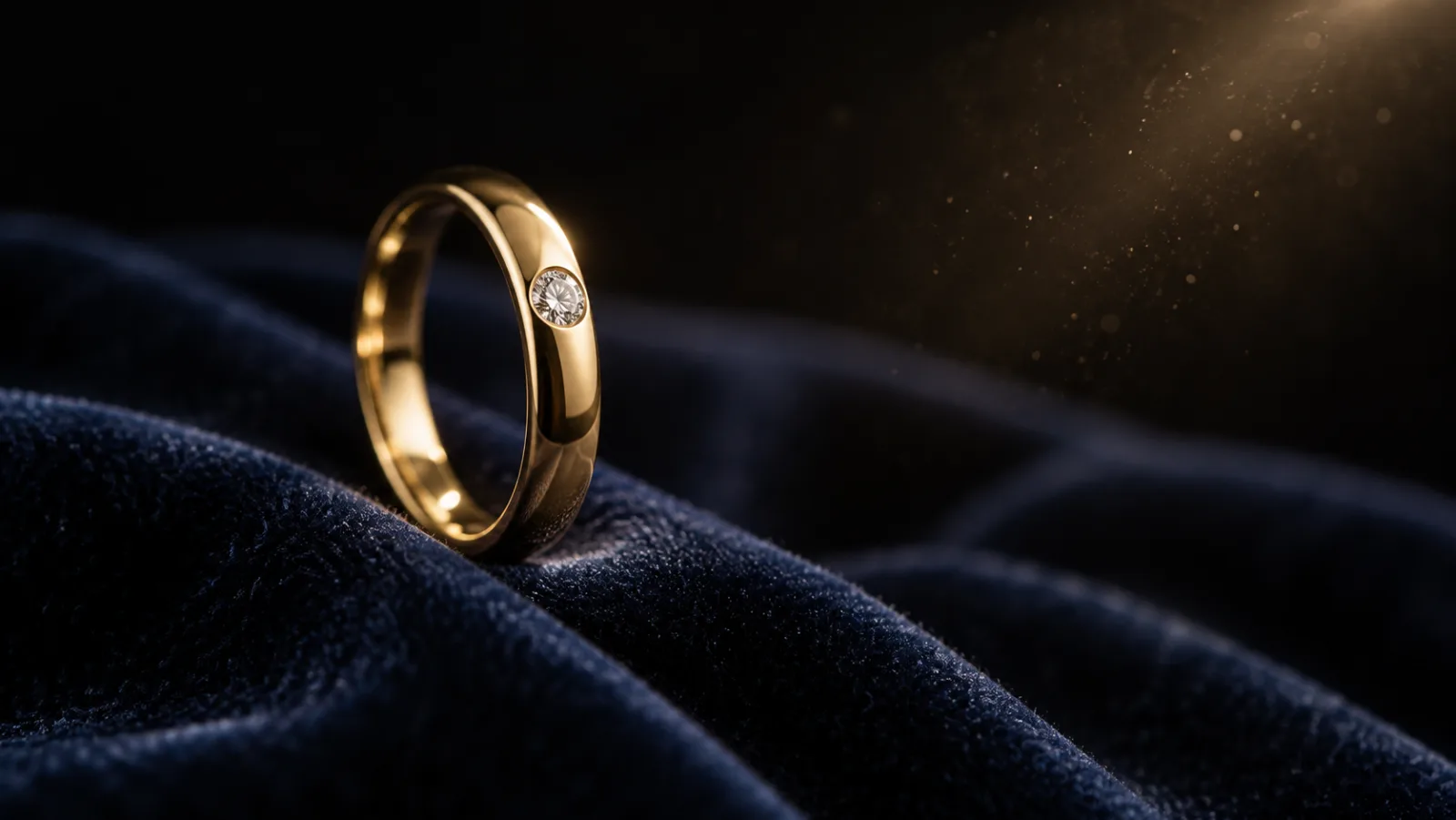
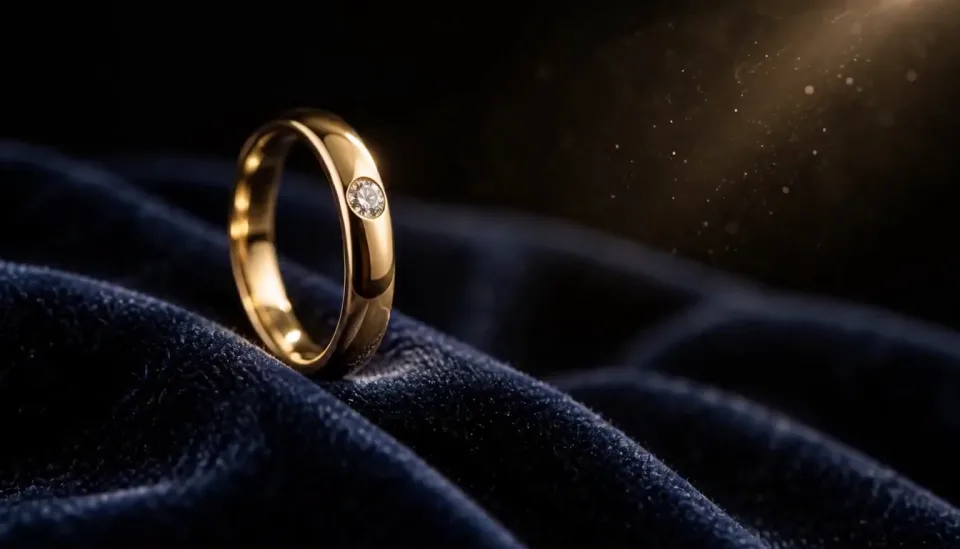
Use the reference ring as the hero product. Slow macro push-in across dark velvet, a single warm key light rolling over the band, dust in the beam, soft piano and a faint shimmer sound, 16:9, 6 seconds.
Reference
Result
Prompt
Start on the reference serum bottle on white marble. A drop falls from the pipette and ripples outward, the camera orbits a quarter turn, morning window light, quiet room tone, 9:16, 10 seconds.
Reference

Result

WHO IT IS FOR
Hailuo AI renders a 15-second vertical ad with voice and music in one pass, which is the length TikTok and Reels ads actually run. No separate audio edit is needed.
Try this use case →Feed a product photo as the first frame and let the model add the orbit, the light sweep, and the unboxing. The references keep the label and colorway exact.
Try this use case →At 20 credits for a 6-second draft, Hailuo AI is the cheapest way on Ricebowl to test ten hooks before you pay for a premium finish.
Try this use case →Widescreen 21:9, cuts written into the prompt, and reference audio for the beat make Hailuo AI a strong tool for title sequences and lyric-driven edits.
Creators who draw in anime or illustration styles pick this model because it keeps the look flat and consistent instead of sliding into 3D.
WHERE IT SITS
MiniMax's video line, from Hailuo 01 to MiniMax H3
WHAT USERS SAY
01
People pick the Hailuo line for action: dance, sport, fights, and fast camera work. Limbs stay attached, clothes move with the body, and impacts land with weight.
02
Since MiniMax H3, every Hailuo AI clip comes back with stereo sound. Users who used to add foley and music in a separate tool now skip that step for drafts.
03
Because a 6-second clip is cheap, creators render three or four takes and keep the best one, instead of rewriting one expensive prompt.
04
Vague prompts give generic results. The users who get the most out of Hailuo AI write the shot like a director: subject, action, camera, light, and sound, in that order.
VERSIONS
Start every new project on H3.
Native 1080p and physics, in 6 or 10-second clips.
Better body motion, micro-expressions and anime styles at the same price.
2K, up to 15 seconds, stereo audio, and text, image, video and audio references in one model.
WHAT SETS IT APART
01
Ricebowl has no free tier with a waiting line. Every Hailuo AI render is paid in credits, new accounts get 8 to start (a 6-second 768p clip is 20), and a job begins the moment you press Generate. The finished MP4 appears in the feed below the generator.
02
Hailuo AI with MiniMax H3 writes dialogue, ambience, and effects in the same pass as the picture, and Ricebowl charges no extra credits for the sound. Upload your own voice or music as a reference when the timing has to match.
OUR TAKE
MiniMax H3 is Hailuo 3.0. MiniMax's own launch post names Hailuo 01 and Hailuo 02 as the two generations before it. Treat 02 and 2.3 as earlier versions: H3 does everything they did and adds 2K, audio, and references.
Hailuo AI is cheaper and runs longer. On Ricebowl a 6-second 768p clip costs 20 credits against 45 for a 10-second Veo 3.1 clip, and MiniMax H3 reaches 15 seconds in one render. Pick Veo 3.1 only when a single 4K hero shot is the whole deliverable.
Read this page to understand the Hailuo AI family and decide whether it fits your project. Go to the MiniMax H3 page for the version details: every setting, prompt pattern, and credit price for the model the generator runs.
COMPARISON
| Feature | Hailuo AI (MiniMax H3) | Veo 3.1 | Kling 3 Omni |
|---|---|---|---|
| Resolution | 768p and 2K | 720p, 1080p, 4K | 1080p and 4K |
| Clip Length on Ricebowl | 6, 10, or 15 seconds | 10 seconds | 5 or 10 seconds |
| Native Audio | Stereo, included | Yes | Yes, priced as a separate option |
| Reference Images | Up to 9 | Up to 3 | Up to 2 |
| First and Last Frame | Yes | First frame | First frame |
| Aspect Ratios | Six, including 21:9 | Landscape and portrait | Landscape and portrait |
| Credits per Clip | 20 (6 s, 768p) | 45 (10 s) | 90 without audio, 130 with audio (5 s, 1080p) |
| Best For | Sound-on drafts, long clips, volume | Short 4K hero shots | Talking characters and multi-shot scenes |
All three run on Ricebowl, so you can switch models in the picker above and render the same prompt on each. Hailuo AI here means MiniMax H3; Hailuo 02 and Hailuo 2.3 are not offered on Ricebowl yet.
Try Hailuo AI for Free01
The generator at the top of this page already has MiniMax H3, the newest Hailuo AI model, selected. Sign up and 8 free credits land in your account, with no card needed. A 6-second 768p clip costs 20 credits, so add credits from a plan or a one-time pack to render.
02
Describe the subject, the action, the camera move, the light, and the sound. Add a first or last frame, up to nine reference images, or an audio track if the result has to match them.
03
Choose 6, 10, or 15 seconds, 768p or 2K, and an aspect ratio. Press Generate and the MP4, sound included, appears in the feed below, ready to download.
REVIEWS
Feedback from people who use Hailuo AI on Ricebowl for real work.
 Daniel R.
I test hooks on the Hailuo model first because a 6-second draft is cheap, then I only pay for a premium render on the winner.
Performance marketer
 Aiko T.
My characters stay flat and on-model across the whole clip. That is why I keep coming back to Hailuo AI.
Anime illustrator
 Marco L.
Reference audio changed my workflow. The cuts land on the beat and the singer's mouth follows the track.
Music video director
 Priya S.
I upload the product photo as the first frame and get an orbit shot with sound in one render. No studio day.
E-commerce founder
 Tom W.
The sprint shots have real weight. It is the model I use when a clip has fast human motion in it.
Freelance editor
One balance, every model. Credits work across all 20 video models — no watermark, no tier-locked models, commercial use on every paid plan.
Save 30% billed annually
Flexible monthly subscription.
The cheapest way to start. Every model, a small monthly budget.
$12.99/mo
Renews monthly, cancel anytime.
400 credits
≈ 1–20 videos, depending on the model
≈ 28–133 images, depending on the model
3.25¢ / credit
Enough credits to try every model and finish a few clips each month.
$29.9/mo
Renews monthly, cancel anytime.
1,000 credits
≈ 3–50 videos, depending on the model
≈ 71–333 images, depending on the model
2.99¢ / credit
2 parallel tasks
Steady output for solo creators going pro — every model, a comfortable budget.
$49.9/mo
Renews monthly, cancel anytime.
2,000 credits
≈ 6–100 videos, depending on the model
≈ 142–666 images, depending on the model
2.50¢ / credit
3 parallel tasks
High-volume production for prolific creators and small teams.
$89.9/mo
Renews monthly, cancel anytime.
5,000 credits
≈ 15–250 videos, depending on the model
≈ 357–1666 images, depending on the model
1.80¢ / credit
5 parallel tasks
Pay yearly and save more.
Enough credits to try every model and finish a few clips each month.
$19.9/mo$29.9
Billed yearly at $238.8. Renews yearly, cancel anytime.
Save $120/yr vs monthly
12,000 credits
≈ 38–600 videos, depending on the model
≈ 857–4000 images, depending on the model
1.99¢ / credit
2 parallel tasks
Steady output for solo creators going pro — every model, a comfortable budget.
$34.9/mo$49.9
Billed yearly at $418.8. Renews yearly, cancel anytime.
Save $180/yr vs monthly
24,000 credits
≈ 76–1200 videos, depending on the model
≈ 1714–8000 images, depending on the model
1.75¢ / credit
3 parallel tasks
High-volume production for prolific creators and small teams.
$62.9/mo$89.9
Billed yearly at $754.8. Renews yearly, cancel anytime.
Save $324/yr vs monthly
60,000 credits
≈ 190–3000 videos, depending on the model
≈ 4285–20000 images, depending on the model
1.26¢ / credit
5 parallel tasks
Top up credits valid for 12 months.
One-time top-up — perfect for occasional needs.
$49.9
One-time purchase, valid 12 months.
1,000 credits
≈ 3–50 videos, depending on the model
≈ 71–333 images, depending on the model
4.99¢ / credit
Larger top-up with 20% bonus — best per-credit value for one-time buyers.
$198
One-time purchase, valid 12 months.
4,800 credits
≈ 15–240 videos, depending on the model
≈ 342–1600 images, depending on the model
4.13¢ / credit
5 parallel tasks

Browse all
Browse all
Your pet takes the mic
Get caught on the big screen
Hold up the red sign and jump
Take the cash, then hit the walk
Walk out to a crowd of fans
A ghost rises right behind them
Walked out by two officers, unbothered
Lean in, arms out, point on the beat
Serious game face, then the toy car
Snap the moon, reveal the witch
Ask the phone how to get rich, hear the answer
Your cat or dog stands up and dances
Wide squat, tiptoes, one-leg freeze
Swagger down the park path, point at the lens
Cup your ears and let the stadium roar
Walk the carpet, stop for the flashes
Bedroom horns, panels shut, night street
Tiny workers wash your truck until it shines
Fake the rabona, leave the defender on the floor
Rocket thrusters fire, your car lifts off

Set up a penny-farthing chase through a palace garden with a golden carriage.

Create a two-person autumn field bounce and finger-point dance.

Create a two-person autumn field reunion clip with a spoken beat and cheering.
Your partner turns zombie, then a warm memory
A loved one turns zombie, hugs you, then a warm memory
Turn your photo into the Ozil goal: dribble, strike, turn and celebrate.
Turn photos into phonk head bop trend videos in minutes.
One photo, a camera orbit around your subject
One or two photos into the vertical sidewalk singing clip
Chandelier party video from your selfie photos
Turn any photo into the tiptoe trend
Create scream-and-swap pet dance clips
Turn your selfie into an animatronic jumpscare
Make your photo lead the 1983 zombie dance in 9:16 vertical video.
Turn one adult photo into a trending 9:16 lip-sync clip in seconds.
Turn one group photo into a crew that steps in sync in 9:16 vertical video.
Turn your photo into a 1980s retro dance video with custom themes.
Pop the bottle from one photo and freeze it black and white.
Turn your photo into a Bulin 47 AI doorway clip.
Do the Layoo dance from one photo with two friends behind you.
Turn your photo into the viral lean, swing and low bounce, friend watching.
Black liquid rebuilds your car from its badge
Put your photo on the red stage doing the 2008 electro arm dance.
Sweep the 2 and 4 cards, reveal a car
Deadpan sway clip from one photo
Costume walk clip from one photo.
Make your pet or baby scold the camera
Make viral sneaky tiptoe videos from photos
Walk out with two officers
Two photos turned into a drill rap video clip.
Turn your pet into a tiny knight in a storm
Turn photos into the hop and knock dance
Switch wardrobe under spinning fan blades
Turn portrait photos into video
Make the viral video from two photos
Turn one pet photo into the stage meme
Dusk road-trip clip from your photos
You and a friend trading bars on one mic
Turn their photo into a funny birthday prank video
One photo zooms out to Earth, Moon or galaxy
Laser eyes, car jumps, hugs and more from one photo
Turn one photo into a video with copies of you
Hug the kid you were in a short video
Turn family photos into a short video clip.
Turn your photo into a cinematic video with effects
Share an imagined hug with someone who passed away
Turn one or two photos into a dance video
Two solo photos, one orange booth, one mic
Sit still while a car flies over you
Turn two photos into a hug video
Turn one or two photos into a gentle memorial clip
Make people in old photos smile, wave or hug
One or two photos into the zombie love story video
Two photos into the viral Hotel Lobby video
Not fully. New accounts get 8 credits on sign-up with no card required, but a 6-second 768p clip on MiniMax H3, the newest Hailuo model, costs 20 credits, so the free credits do not cover a full clip. Clips are paid in credits from a plan or a one-time pack.
Hailuo AI is the video generation line from the AI company MiniMax. It started with Hailuo 01, grew into Hailuo 02 and Hailuo 2.3, and its third generation is MiniMax H3, an open multimodal model that turns text, images, video, and audio into video with native stereo sound.
Yes. MiniMax H3 is the newest Hailuo AI model, sometimes written as Hailuo 3.0, and MiniMax's own Hailuo site promotes it as the current model. It is the model the generator on this page runs. The MiniMax H3 page covers its settings in detail.
You write a prompt and, if you want, attach a first frame, a last frame, reference images, or an audio track. Hailuo AI reads all of it as one context and renders the picture and the sound together. On Ricebowl you pick length, resolution, and aspect ratio, press Generate, and download the MP4.
On Ricebowl a Hailuo AI clip at 768p costs 20 credits for 6 seconds, 40 for 10 seconds, and 60 for 15 seconds. At 2K it costs 40, 70, and 105 credits. Five reference images are included; each extra one adds 3 credits. The plans below show what a credit costs.
Hailuo AI with MiniMax H3 outputs MP4 at 768p or 2K (2560x1440), 24fps, in 16:9, 9:16, 4:3, 3:4, 1:1, or 21:9. Inputs can be JPG, PNG, WEBP, or HEIC images plus reference video and audio clips. A single clip runs 6, 10, or 15 seconds here.
Yes. Control the start and end with first and last frames, lock a face or product with up to nine references, steer the camera in the prompt, and set the sound with a line such as "soft rain, no dialogue" or with your own audio file. If a take misses, change one instruction and render again.
Not in one render: a single Hailuo AI clip stops at 15 seconds. Longer films are made the way the Hailuo 02 launch film was, by generating many short clips with the same references and editing them together. Using a clip's last frame as the next clip's first frame keeps the cut seamless.
For a 4K hero shot, Veo 3.1 is the best Hailuo AI alternative. For talking characters and multi-shot scenes, choose Kling 3 Omni. For restyling an existing video, try Seedance 2.5. All three run on Ricebowl, so you can compare them with the same prompt, using the same credits, in the picker above.
RELATED
MORE MODELS
on Ricebowl
The newest Hailuo AI model, 2K clips up to 15 seconds with stereo sound. New accounts get 8 credits on sign-up, and a 6-second 768p clip costs 20.
Try Hailuo AI for Free8 FREE CREDITS · 768P OR 2K · UP TO 15 SECONDS · SOUND INCLUDED
Try MiniMax Hailuo AI
Try Hailuo AI for Free