Holiday Greetings and Group Chats
Brighten your family group chat with a lively five-second clip created from an old gathering snapshot. It gives everyone a sweet moving greeting to celebrate holidays and milestones.
Turn family photos into an ai family video clip in your browser. Upload one or two photos, pick a family effect, and watch your moment move.
Only upload photos you have the right to use, and ask the people in them before sharing.
 5s Living Room Clip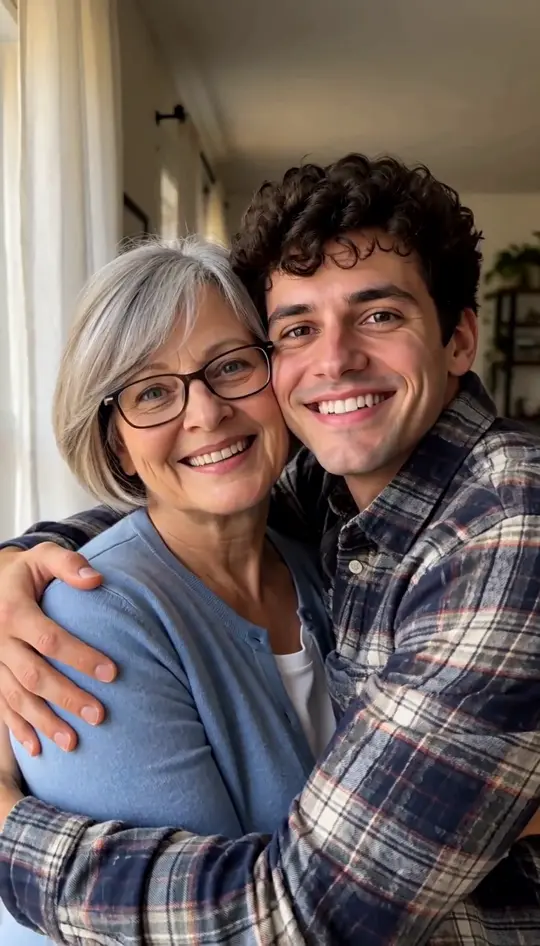



Browse all
Clip Examples
Explore what an ai family video produces using everyday photos. Clips one through eight were generated directly on this page from photos of fictional people who do not exist, without any editing afterward. The final two sample blocks come from other AI tools and are included only to show what other family clips often look like across the web.
Start AI Family VideoMade on This Page 01
An older man with white hair in a beige cardigan opens the front door on a sunny porch. A young woman with long auburn hair steps in. They share a warm hug, laugh together, and end cheek to cheek smiling at the camera. The ten-second length gives the hug and smiles more time.
Made on This Page 02
An older woman with a grey bob and glasses opens her front door on a sunny afternoon. A young man with dark curly hair in a plaid shirt steps in from the side. They hug and laugh, finishing cheek to cheek. It fits a parent and grown child who live apart.
Made on This Page 03
A young man with dark wavy hair stands on the porch as the wooden door swings open. He smiles warmly, walks forward with open arms, and hugs the camera close. The viewer acts as the camera and does not appear, making the clip feel like a personal greeting.
Made on This Page 04
A man with a short beard and a woman with curly hair sit on a sofa in a bright room with tall windows. He cradles an imagined sleeping newborn wrapped in a white blanket. Both glance down at the baby, look up at the camera, and smile. This is not a prediction.
Made on This Page 05
A young woman with a shoulder-length bob stands beside a tall nursery window with a crib and city view behind her. She cradles a sleeping newborn in a white blanket, looks down at the baby, and smiles at the camera in this gentle ai family video.
Made on This Page 06
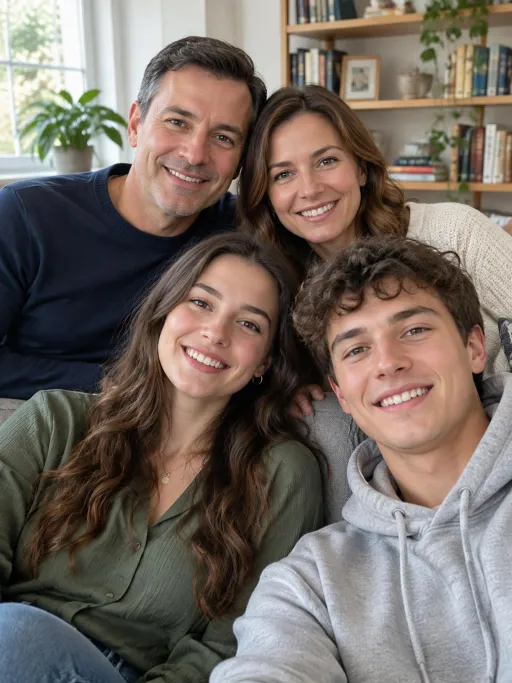
A man with short brown hair and a woman with long dark hair sit side by side on a sofa facing the camera. He breaks into a big smile while she leans in closer and laughs. This simple clip feels like a classic family photo to video moment that comes alive.
Made on This Page 07
An older man in a beige cardigan stands by a window in warm morning light and smiles warmly. A young man in a black T-shirt steps in. They hug side by side, cheek to cheek, and both smile at the camera. The scene remains calm and plain, without special effects.
Made on This Page 08
An older woman with short grey curly hair stands in a quiet living room with warm window light. She turns to the camera, smiles warmly, walks forward with open arms, and hugs the camera close. The first-person angle offers a quiet, gentle way to remember a beloved grandparent.
Made by Other AI Tools
Other tools generate horizontal scenes: a family on an orchard blanket, parents with kids walking barefoot on a beach, or a family hiking a forest bridge with a retriever. These were not made on this page. Our ai family video tool focuses on four specific indoor and porch effects, without pets.
Made by Other AI Tools
Other tools show horizontal clips of three generations on a porch at dusk, kids unwrapping Christmas gifts by a fireplace, or candlelit holiday dinners. These clips were not made on this page. We offer no holiday scenes; a Family Portrait clip from your own holiday photo is the closest thing here.
Practical Uses
Brighten your family group chat with a lively five-second clip created from an old gathering snapshot. It gives everyone a sweet moving greeting to celebrate holidays and milestones.
Parents and grown children in different cities can finally share a warm hug on screen. Uploading two separate portraits creates an ai family video that brings both people together.
Couples can enjoy a lighthearted peek at an imagined nursery scene holding a sleeping newborn in an ai family video. This sweet moment is made just for fun to share with close friends.
Delight your parents or grandparents on their anniversary with an ai family video clip. Seeing family members smile and wave together makes a memorable digital gift.
Honor someone you miss with a calm memorial hug bathed in soft morning window light. It offers a peaceful way to hold onto treasured memories of loved ones.
Photo Selection
Helpful Reminders
01
Every ai family video is an imagined scene generated by AI rather than authentic footage. Faces stay close to your original photos, but smaller physical details can differ.
02
Always check with the people shown in your photos or their close relatives before uploading or sharing. Making an ai family video should remain a positive and respectful experience for all.
03
The sleeping baby in this ai family video effect is purely an imagined newborn added by the model. It does not predict future children and is never based on genetic traits.
04
Always mark your finished clip as an ai family video whenever you post it online. Please handle memorial scenes with extra care around family members who are still grieving.
Video Reel Ideas
Each ai family video generates one short clip. You can create several clips and combine them in your favorite video editor to build a complete family reel.
Begin your reel with a moving AI family portrait made from your favorite group picture.
Add a front porch hug clip connecting two family members living apart in a moving ai family video.
Include a playful future baby clip showing an imagined newborn in a gentle nursery ai family video.
Feature a welcoming first-person hug clip filmed as if embracing the viewer.
Honor a beloved grandparent with a quiet memorial hug created as a respectful ai family video.
Finish your assembled reel on the entire family smiling and waving together on the sofa.
Key Features
01
Pick one of four curated settings and generate immediately without typing complex text prompts.
02
Select either a quick 5-second clip or an extended 10-second duration for your ai family video.
03
Download a clean vertical video formatted for phone screens with no added watermarks.
04
Every generation includes soft instrumental background audio that you can swap inside any video editor.
Photo Setup Guide
You can start your ai family video with either one photo or two separate portraits. The choice simply determines the framing of your finished clip.
Use a group snapshot only with the Family Portrait effect. Everyone included in the original frame remains in the clip, smiling and waving together on the sofa.
Uploading a single person turns the porch hug and memorial hug into a first-person embrace directed toward the camera. In the future baby effect, that person appears holding the sleeping newborn by a nursery window.
Upload two separate photos to bring both individuals together into a single shared scene. Each person keeps their own face, appearing together side by side without swapped features.
Specifications
| What you want to know | Answer |
|---|---|
| What does it make? | One short vertical clip showing an imagined family moment with people from your photos. |
| How many photos are needed? | Photo 1 is required; Photo 2 is optional. |
| Can I upload group photos? | Yes, but only in the Family Portrait effect where everyone stays in the clip. |
| What effects are available? | Family Portrait, Family Hug, Future Baby, and Memorial Hug. |
| How long is each clip? | You can choose either 5 seconds or 10 seconds. |
| What is the video shape and resolution? | Vertical 9:16 aspect ratio in 768p MP4 format with no watermark. |
| Does it include background sound? | Yes, each ai family video has soft instrumental background music without words. |
| Is there voice, talking, or lip sync? | No, nobody speaks in the video and there is no lip sync. |
| How much does a clip cost? | A 5-second clip costs 20 credits and a 10-second clip costs 40 credits. |
| What starter credits are provided? | New accounts receive 20 credits once per device and network. |
| How long does generation take? | Most clips finish in 20 to 41 seconds, though busy periods can take a few minutes. |
| What happens if generation fails? | Credits deducted for a failed generation return to your account automatically. |
Monthly plan credits can be used toward any family effect and either clip length.
Start AI Family Video01
Add a single portrait, a group picture for the portrait effect, or two separate photos of family members.
02
Select one of four family moments and choose either a 5-second or 10-second vertical duration.
03
Wait while it renders, usually under a minute, then download your vertical 768p MP4 video with no watermark.
One balance, every model. Credits work across all 20 video models — no watermark, no tier-locked models, commercial use on every paid plan.
Save 30% billed annually
Flexible monthly subscription.
The lowest price to get started. Every model, a monthly budget to try things out.
$7.99/mo
Renews monthly, cancel anytime.
200 credits
≈ 0–10 videos, depending on the model
≈ 14–66 images, depending on the model
4.00¢ / credit
The cheapest way to start. Every model, a small monthly budget.
$12.99/mo
Renews monthly, cancel anytime.
400 credits
≈ 1–20 videos, depending on the model
≈ 28–133 images, depending on the model
3.25¢ / credit
Enough credits to try every model and finish a few clips each month.
$29.9/mo
Renews monthly, cancel anytime.
1,000 credits
≈ 3–50 videos, depending on the model
≈ 71–333 images, depending on the model
2.99¢ / credit
2 parallel tasks
Steady output for solo creators going pro — every model, a comfortable budget.
$49.9/mo
Renews monthly, cancel anytime.
2,000 credits
≈ 6–100 videos, depending on the model
≈ 142–666 images, depending on the model
2.50¢ / credit
3 parallel tasks
High-volume production for prolific creators and small teams.
$89.9/mo
Renews monthly, cancel anytime.
5,000 credits
≈ 15–250 videos, depending on the model
≈ 357–1666 images, depending on the model
1.80¢ / credit
5 parallel tasks
Pay yearly and save more.
Enough credits to try every model and finish a few clips each month.
$19.9/mo$29.9
Billed yearly at $238.8. Renews yearly, cancel anytime.
Save $120/yr vs monthly
12,000 credits
≈ 38–600 videos, depending on the model
≈ 857–4000 images, depending on the model
1.99¢ / credit
2 parallel tasks
Steady output for solo creators going pro — every model, a comfortable budget.
$34.9/mo$49.9
Billed yearly at $418.8. Renews yearly, cancel anytime.
Save $180/yr vs monthly
24,000 credits
≈ 76–1200 videos, depending on the model
≈ 1714–8000 images, depending on the model
1.75¢ / credit
3 parallel tasks
High-volume production for prolific creators and small teams.
$62.9/mo$89.9
Billed yearly at $754.8. Renews yearly, cancel anytime.
Save $324/yr vs monthly
60,000 credits
≈ 190–3000 videos, depending on the model
≈ 4285–20000 images, depending on the model
1.26¢ / credit
5 parallel tasks
Top up credits valid for 12 months.
One-time top-up — perfect for occasional needs.
$49.9
One-time purchase, valid 12 months.
1,000 credits
≈ 3–50 videos, depending on the model
≈ 71–333 images, depending on the model
4.99¢ / credit
Larger top-up with 20% bonus — best per-credit value for one-time buyers.
$198
One-time purchase, valid 12 months.
4,800 credits
≈ 15–240 videos, depending on the model
≈ 342–1600 images, depending on the model
4.13¢ / credit
5 parallel tasks
Everything you need to know about photos, effects, video lengths, and credits before you generate.
Start AI Family VideoAn ai family video is a short vertical video clip generated from one or two ordinary portrait photos. The tool places the people from your pictures into an imagined family moment with natural motion and soft background music. It works directly inside your web browser on a phone or computer using MiniMax H3.
You start by uploading one or two clear portrait photos and selecting one of the four available family effects. Next, choose your preferred clip length of either five or ten seconds and click generate. If you want to explore beyond an AI family video, our guide walks through other photo trends step by step.
A 5-second clip costs 20 credits, while a 10-second clip costs 40 credits. New accounts get 20 credits once per device and network, which is enough for one 5-second clip, and an account is needed to generate. Plans start at $7.99 a month for 200 credits.
You can use a single group photo, but only when selecting the Family Portrait effect. In our benchmark test with a four-person family portrait on a sofa, everyone in the original picture remained in the moving clip. For Family Hug, Future Baby, and Memorial Hug, upload photos containing only one person.
When you upload two photos, each person retains their distinct face taken from their respective image. In our tests, facial identities stayed with the correct person throughout the clip without feature swapping. While minor cosmetic details can differ from the original snapshot, both individuals appear together naturally.
The newborn shown in Future Baby is an imagined baby created by the AI rather than a depiction of your actual child. The baby sleeps wrapped in a white blanket with eyes closed and is not generated from either face or genetic traits. If you want an imagined baby photo from two photos instead, try our AI Baby Generator.
You do not need two photos to make an ai family video. When uploading one photo, Family Hug and Memorial Hug become first-person scenes where the person embraces the camera. For Future Baby, a single photo shows that individual holding the sleeping newborn beside the window.
Every video clip includes soft instrumental background music added during generation, with no lyrics or dialogue. The background music cannot be turned off on this page, but you can swap the audio track using any video editor after downloading. The people in the clip do not speak, and there is no voice or lip sync.
Each clip lasts either 5 seconds or 10 seconds depending on the duration you select before generating your ai family video. If you want a longer project, you can make several clips on this page and join them together in a video editor. This approach lets you combine multiple moments into a complete story.
In our tests, most video clips finished rendering in 20 to 41 seconds. During busy server periods, generation can occasionally take a few minutes to complete. Please keep the browser page open while the model finishes processing your video.
Yes, the Memorial Hug effect offers a calm, respectful setting bathed in soft morning window light to remember someone special. It presents an imagined peaceful moment without any supernatural elements. Please check with close family before sharing the clip, and always label it as an ai family video when posting.
The tool features four fixed presets without custom typed text prompts or custom scene uploads. All four effects are designed specifically for human portraits, so pet photos are not supported. Additionally, all clips are rendered strictly in vertical phone format without horizontal options.
Explore More Tools
Upload your favorite portrait pictures, select one of four warm family effects, and download your vertical ai family video clip directly to your device.
Make AI Family Video20 CREDITS FOR A 5-SECOND CLIP
Create Your Own
Start AI Family Video