Hotel Lobby AI Video Generator

Upload two photos, one for the left and one for the right. Pick the shape and length, and get your hotel lobby AI video with sound in a few minutes.

Quality
Length
Sound
Photo 1Photo 2Your video
Real input, real output

WHAT GOES IN, WHAT COMES OUT

Two Everyday Photos In, One Hotel Lobby AI Video Out

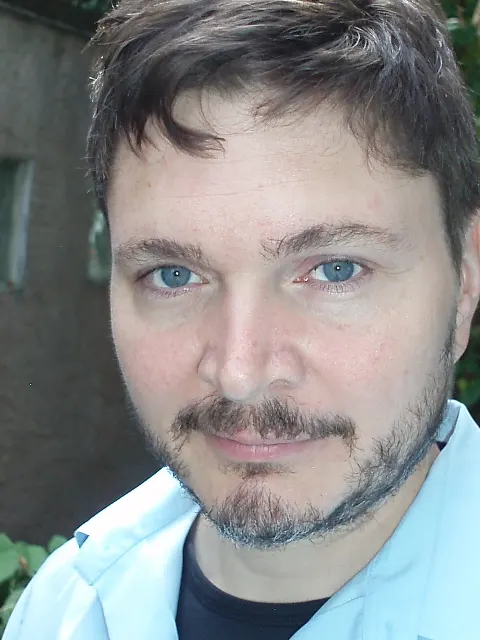
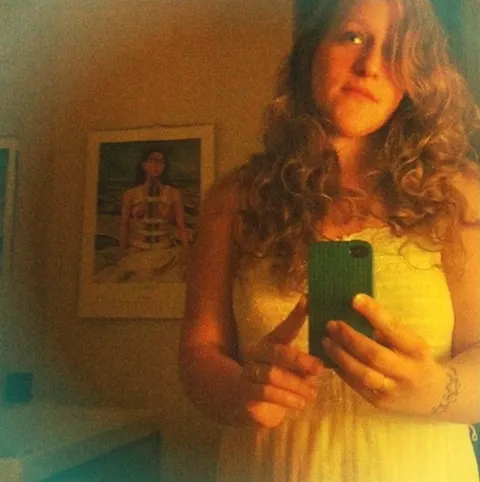
These are the exact two photos we uploaded and the hotel lobby AI videos that came back, untouched. Neither photo is a studio shot: one is a close-up selfie, the other a dim mirror selfie with a phone in hand.

The two photos we uploaded

Photo 1 · left
Photo 1 · leftClose-up selfie. Only the collar of the shirt is visible.
Photo 2 · right
Photo 2 · rightMirror selfie in a dark room, phone covering part of the body.

The videos that came back

480p5 s · with sound · 50 credits
720p5 s · with sound · 90 credits

What the AI kept and what it filled in

  • Faces and hair come straight from your photos, and the left photo always stays on the left.
  • Clothes follow what the photo shows. From a collar it guessed a full light blue shirt; from the mirror shot it kept the white dress.
  • Bad light is fixed. The dark mirror selfie comes out evenly lit in the orange studio.
  • The phone, the bedroom and the background disappear. The studio, the mic, the moves and the sound come from the template.

Every render is a little different. If the first one looks off, run it again before you change photos.

THE TREND

What Is the Hotel Lobby AI Trend?

Two people stand in a bright orange studio and take turns rapping into one microphone that hangs from the ceiling. The scene comes from a COLORS show performance of "Hotel Lobby (Unc & Phew)", the 2022 song by Quavo and Takeoff, two members of Migos who recorded together as Unc & Phew. That is why the same meme is also called the Migos AI trend, the COLORS AI trend or the hotel lobby AI filter. Ricebowl is not affiliated with the artists, Migos or COLORS. The trend took off on TikTok in September 2026: people put themselves, their friends or their dog into that orange booth with AI, then post it. It looks like a face swap, but the whole clip is made new from your two photos, so you only need those. The studio, the mic, the moves and the sound come built in.

Make My Hotel Lobby AI Video
Who People Cast 01

Best Friends on One MicThe most common pairing

This is how most people start: you on the left, your best friend on the right. Grab one solo photo of each of you, drop them into the two boxes and generate. The video keeps both faces, hair and outfits from the photos, so it reads as the two of you, not two random rappers. Tag your friend when you post it; that is half the fun of the hotel lobby trend.

  • One photo per person, left and right
  • Faces and outfits come from your photos
  • Comes back with sound, ready to post

Who People Cast 02

Couples Matching the VibeA video for two

Couples use it as a quick anniversary post or an inside joke. It works for any pair, including two women or two men: the tool does not care who is on which side. Pick photos where you are both dressed in the style you want to see, because the outfit in the photo is the outfit in the video.

  • Works for any two people
  • Outfit in the photo is the outfit on screen
  • Swap sides by swapping the photos

Who People Cast 03

Brothers, Sisters, Parents and KidsFamily takes over the booth

Dad and son, two sisters, grandma and grandkid: family versions of the video get shared far beyond TikTok, into group chats and family albums. The scene stays the same orange studio every time, so the only thing that changes is who is in it. That is exactly why unexpected pairs get the biggest reaction.

  • Same studio and mic for every pair
  • Unexpected pairs get the most shares
  • Download and send it anywhere

Who People Cast 04

Yes, Your Dog Can Rap TooPets and cartoon characters

People also cast their dog, their cat or a cartoon character. It can work, but results vary more than with human faces: a clear, front-facing photo with the whole head in frame gives the AI the best chance. If the first try looks off, run it again with a different photo before you give up.

  • Clear, front-facing photos work best
  • Results vary more than with people
  • Try a second photo if the first looks off

PHOTO TIPS

What Photos Work BestAnd the common mistakes that ruin the result

Photos that work

  • One person per photo: a solo shot for the left box and a solo shot for the right box
  • Good light on the face: daylight or a bright room, no heavy shadows
  • Looking at the camera: front-facing shots keep the face most faithful
  • Head and shoulders in frame: leave some space around the head, and show the top you want to wear

Common mistakes

  • Group photos: two or more faces in one box confuse the AI about who goes where
  • Strong backlight: a dark face against a bright window loses detail
  • Tight face crops when the outfit matters: it still works, but the AI has to guess what you are wearing
  • Giving up after one try: every render is different, so run it again before you change photos
Make My Hotel Lobby AI Video

THE TEMPLATE

The Hotel Lobby AI Template: What's Built In

01

The orange studio and one hanging mic

The template is always the same scene: a plain orange wall in the style of the COLORS booth, one microphone on a cable between the two of you, and a locked-off camera. There is no prompt to write and nothing to set up; your two photos are the only input.

02

Two people taking turns

The left photo becomes the person on the left and the right photo becomes the person on the right. They lean into the mic in turns with confident hand moves, and the faces stay separate.

03

Any shape, 5 to 15 seconds

Pick portrait 9:16 for TikTok and Reels, landscape 16:9 like the original, or square. Your hotel lobby AI clip can be 5, 10 or 15 seconds at 480p or 720p; the button shows the price before you start. A 5-second 480p clip is 50 credits.

04

The sound is already in it

The video comes back with the beat and the voices, timed to the moves. Download it and post it; you don't need to add a sound in the app.

HOW IT WORKS

How to Do the Hotel Lobby Trend with AI

Make My Hotel Lobby AI Video

01

Upload the left photo

Tap the Left Person box at the top of this page and pick a solo photo with a clear face.

02

Upload the right photo

Do the same in the Right Person box. Want to switch sides? Swap the two photos.

03

Make the video

Choose the shape, length and quality of your hotel lobby AI video, then press the button. Sign in when asked; your photos stay in place. The video takes about 2 to 3 minutes.

04

Download and post

Save the video to your phone and post it on TikTok, Reels or Shorts. The sound is already in the clip.

Hotel Lobby AI Pricing

One balance, every model. Credits work across all 20 video models — no watermark, no tier-locked models, commercial use on every paid plan.

Save 30% billed annually

Flexible monthly subscription.

Lite Monthly

The cheapest way to start. Every model, a small monthly budget.

$12.99/mo

Renews monthly, cancel anytime.

400 credits

≈ 1–20 videos, depending on the model

≈ 28–133 images, depending on the model

3.25¢ / credit

  • 1080p · No watermark · Commercial use
  • Credits reset every billing month
  • Access to all models
  • Watermark-free outputs
  • Buy an add-on credit pack
  • Standard support

Starter Monthly

Enough credits to try every model and finish a few clips each month.

$29.9/mo

Renews monthly, cancel anytime.

1,000 credits

≈ 3–50 videos, depending on the model

≈ 71–333 images, depending on the model

2.99¢ / credit

2 parallel tasks

  • 1080p · No watermark · Commercial use
  • Credits reset every billing month
  • Access to all models
  • Watermark-free outputs
  • Buy an add-on credit pack
  • Standard support

Standard Monthly

Popular

Steady output for solo creators going pro — every model, a comfortable budget.

$49.9/mo

Renews monthly, cancel anytime.

2,000 credits

≈ 6–100 videos, depending on the model

≈ 142–666 images, depending on the model

2.50¢ / credit

3 parallel tasks

  • 1080p · No watermark · Commercial use
  • Credits reset every billing month
  • Access to all models
  • Watermark-free outputs
  • Buy an add-on credit pack
  • Priority support

Advanced Monthly

High-volume production for prolific creators and small teams.

$89.9/mo

Renews monthly, cancel anytime.

5,000 credits

≈ 15–250 videos, depending on the model

≈ 357–1666 images, depending on the model

1.80¢ / credit

5 parallel tasks

  • 1080p · No watermark · Commercial use
  • Credits reset every billing month
  • Access to all models
  • Watermark-free outputs
  • Buy an add-on credit pack
  • Priority support

Hotel Lobby AI FAQ

Quick answers before you make your first video.

Make My Hotel Lobby AI Video
How do I make a hotel lobby AI video?

Upload a solo photo for the left person and one for the right person, press Generate and sign in. Your video is ready in about 1 to 3 minutes.

How much does hotel lobby AI cost?

Hotel lobby AI uses credits. A 5-second 480p video is 50 credits and 720p is 90; longer videos cost more, and the button shows the exact price. Plans start at $12.99 a month for 400 credits.

Is there a hotel lobby AI app?

You don't need one. This page works in your phone's browser: upload from your camera roll, generate and download the video straight to your phone.

Is there a hotel lobby AI filter on TikTok or CapCut?

Not one you can tap in the app. What people call the hotel lobby AI filter is a video made by an AI video maker like this one: add two photos, get the full clip with sound, then post it on TikTok or CapCut.

Is this the same as the Migos AI trend?

Yes. The Migos AI trend, the COLORS AI trend and the hotel lobby trend all mean the same video: two people swapped into the orange booth from Quavo and Takeoff's "Hotel Lobby" performance. This page makes that video from your own photos.

Is there a free hotel lobby AI template?

The template is built into this page and costs nothing to use: the studio, the mic and the moves are already set up, and there is no prompt to write or copy. You only pay for the video itself, from 50 credits for 5 seconds at 480p.

How many photos do I need?

Two: one for the person on the left and one for the person on the right. Each photo should show one person. A normal selfie is fine, as the example above shows.

Does the video have sound?

Yes. The video comes back with a beat and both voices, timed to the moves, so you can post it as it is. The audio is made by the AI to match the scene; it is not a copy of the song, and this page does not host the Hotel Lobby lyrics.

Can two girls or two guys be in it?

Yes. Any two people work, in any combination. Put whoever you want on the left and the right.

Can I change the outfits?

The video keeps the clothes from your photos. To wear something else, upload a photo of yourself in that outfit.

How long does it take?

Usually 2 to 3 minutes. Keep the page open while it renders and the video appears right under the button.

Does it work with pets or cartoons?

It can. Clear, front-facing photos give the best results, but pets and cartoons vary more than human faces, so try a second photo if needed.

Can I post it on TikTok, Instagram or YouTube Shorts?

Yes. Your hotel lobby AI video downloads straight to your phone with the sound in it. Pick portrait 9:16 before you start and it fills the screen on TikTok, Reels and Shorts.

What happens to my photos?

Your photos are only used to make your video. Videos from free accounts may appear in our public gallery; paid subscribers can keep theirs private.

Make Your Hotel Lobby AI Video TonightTwo photos, a few minutes.

One orange studio, one mic, both of you on it, sound included. Download it and post it.

Make My Video

FROM 50 CREDITS · WITH SOUND · NO APP NEEDED

Make Your Hotel Lobby AI Video Tonight

Make My Hotel Lobby AI Video