Social creators chasing trends
Pick a template, drop in a selfie, and post a clip that matches the effect everyone is sharing this week. PixVerse AI handles the choreography, so you spend your time on the caption, not the keyframes.
PixVerse AI V6 turns a prompt, a photo, or one of 50 trend templates into a clip of up to 15 seconds at 1080p, with sound generated in the same pass. Sign up free and the generator below is already set to V6.
Select video duration
Select resolution
Select aspect ratio
NO WATERMARK
Ricebowl does not stamp its own logo on your downloads. Every PixVerse AI render you pay for lands in your feed as an MP4 you can post, send to a client, or cut into an ad without a cleanup pass. The same rule covers every other model in the workspace.
Try PixVerse AI NowFeature 01
One Idea, Many Looks
PixVerse AI reads style words as instructions, not decoration. Ask for anime cel shading, a 35mm film look, claymation, or glossy product CGI and PixVerse AI changes the lighting, texture, and motion rhythm to match, not just the color grade. Because text and image input both work, you can lock a character from a photo and then push the same shot through three looks to see which one fits the campaign. PixVerse's own launch notes add that V6 renders English and Chinese text inside the frame with consistent placement, so a title card survives the style change.
Feature 02
50 Templates, One Photo Each
The Effect Library is why most people search for PixVerse AI in the first place. On Ricebowl the generator carries 50 PixVerse AI templates, from Thriller Dance Steps and Fluffy Chef to Cyber Armor and a run of football celebrations. Pick one, upload a single photo (one template takes two), and PixVerse AI builds the motion, the camera, and the timing for you. You skip the prompt entirely, which makes templates the fastest route from a selfie to a clip that looks like the trend everyone is posting.
PROMPT EXAMPLES
Prompt
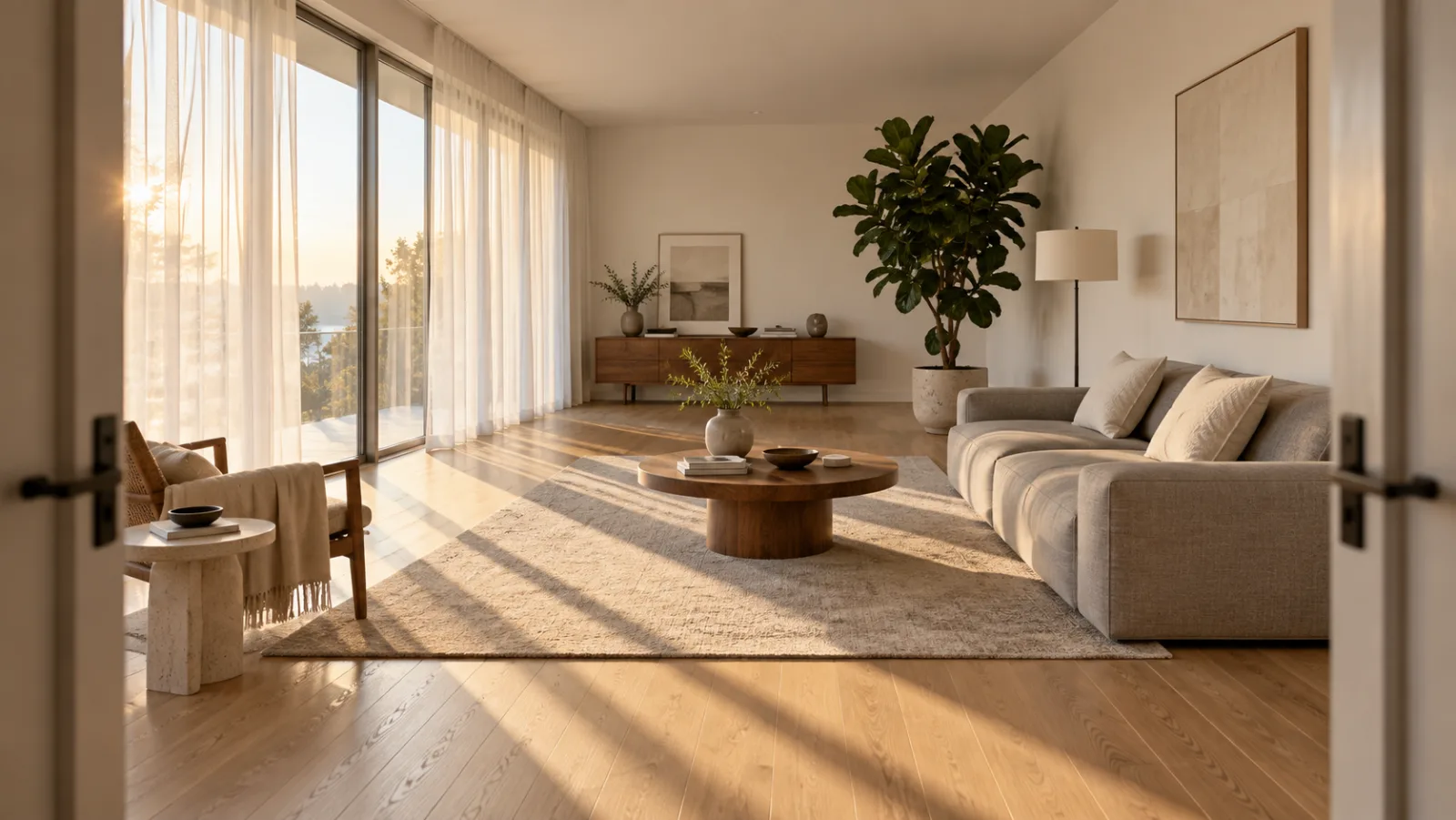
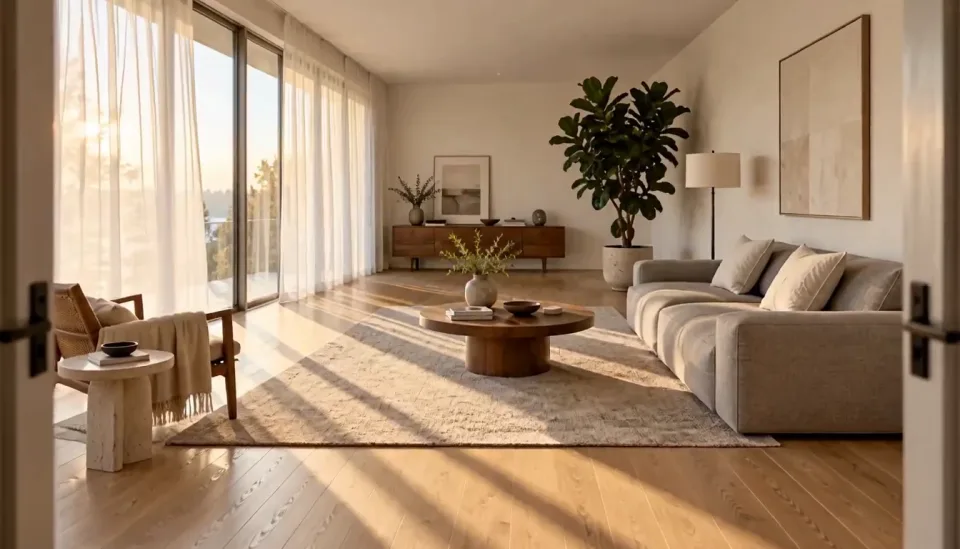
Use the reference living room as the set. Slow dolly forward from the doorway, afternoon sun sliding across the oak floor, sheer curtains moving in a light breeze, soft room tone and a distant bird call, 16:9, 10 seconds.
Reference
Result
Prompt
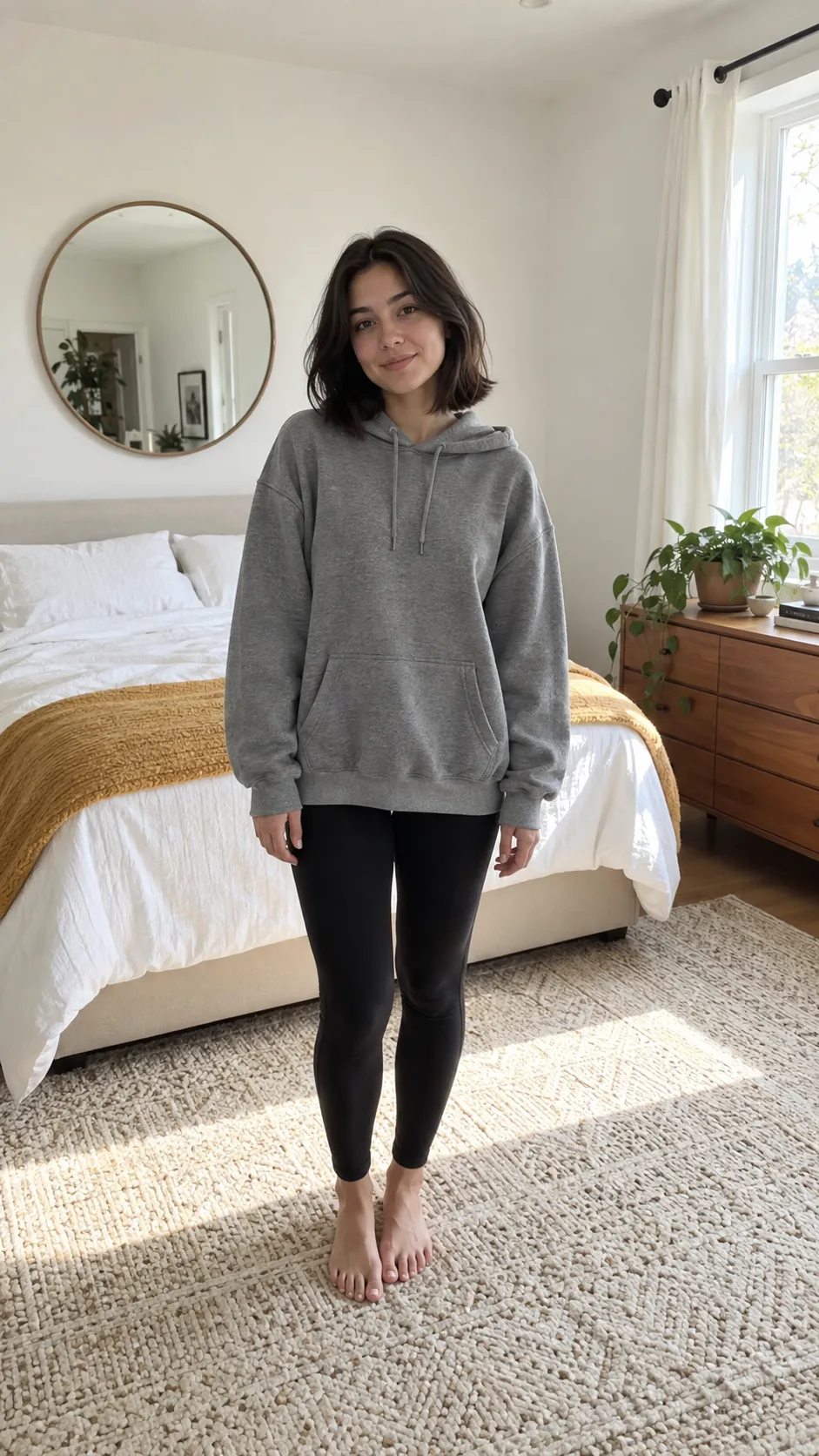
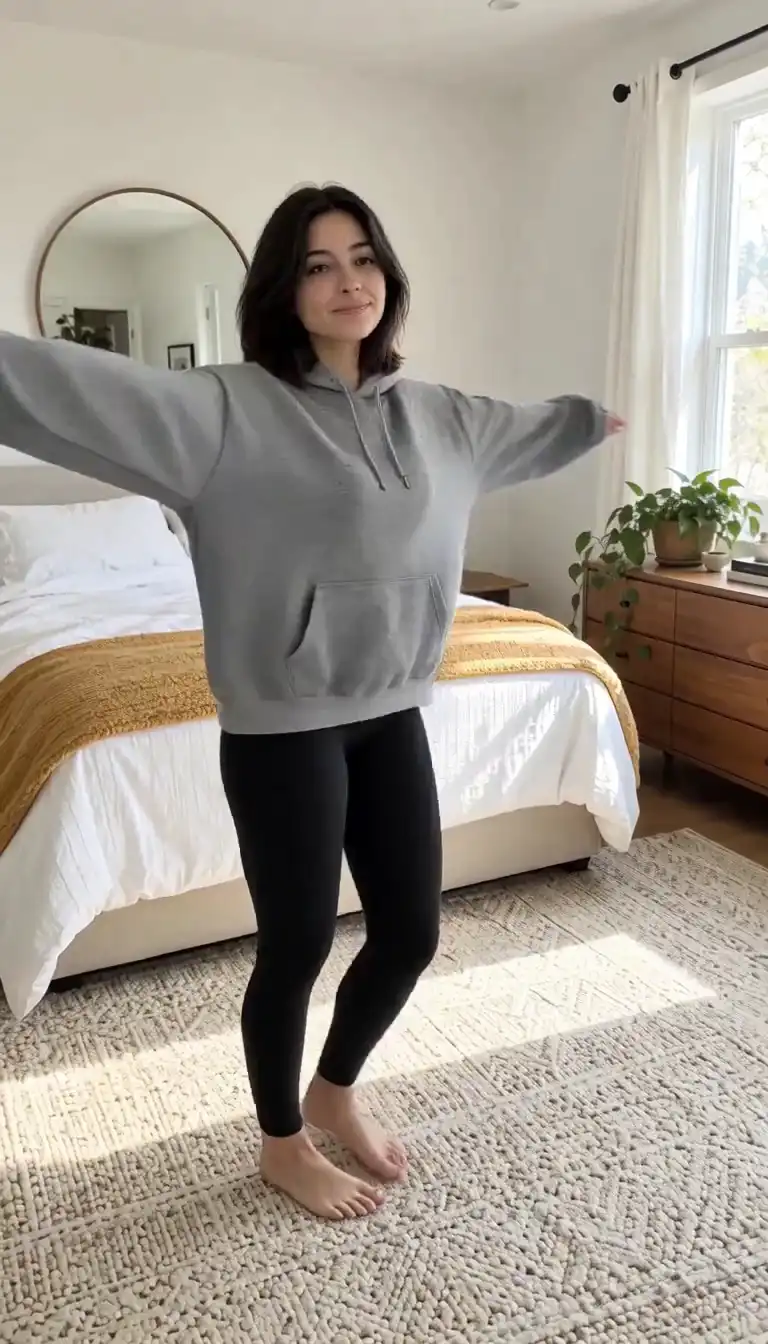
The woman in the reference photo spins once in place and her outfit changes from a grey hoodie to a red satin dress mid-turn. Handheld phone framing, bright bedroom light, a whoosh on the change and an upbeat pop loop, 9:16, 5 seconds.
Reference
Result
USE CASES
Pick a template, drop in a selfie, and post a clip that matches the effect everyone is sharing this week. PixVerse AI handles the choreography, so you spend your time on the caption, not the keyframes.
Test five ad hooks in an afternoon. A 5-second PixVerse AI clip with sound costs 115 credits on Ricebowl, so you can render several openings, keep the one that holds attention, and only then pay for a 15-second 1080p cut.
Try this use case →Upload a product shot and let PixVerse AI orbit it, drop it into a scene, or run it through the Product Landmark template. Sound comes with the render, so the unboxing already has the tear and the click.
Try this use case →Turn on Multi-Clip and PixVerse AI cuts one prompt into wide, medium, and close shots with dialogue and ambience. It is the quickest way to rough out a scene before you commit to a longer production.
Feed PixVerse AI a still of a room or a resort and get a slow camera move with natural light and room tone. It turns a listing photo into a clip that works as a Reel or a landing-page loop.
WHAT USERS SAY
01
Most PixVerse AI users never write a prompt. They pick an effect, upload a photo, and post. The template already knows the timing of the trend, which a hand-written prompt rarely nails on the first try.
02
PixVerse's own V6 review found PixVerse AI performs best when a prompt names visible detail: the subject, the camera path, the light, and the sounds. Vague adjectives waste renders.
03
Because PixVerse AI renders audio with the picture, a first draft already has footsteps, room tone, or a line of dialogue. Reviewers react to it as a video, not a silent mock-up.
04
On the Artificial Analysis text-to-video arena, PixVerse V6 sits at an Elo of 1076, level with Kling 3 Omni but well below MiniMax H3 (1220) and Seedance 2.0 (1210). People pick PixVerse AI for effects and speed, not for the most realistic frame.
VERSION CHECK
V6 is the only version worth using now. On the Artificial Analysis text-to-video arena it scores 1076 against 952 for V5.6, and it adds longer takes, multi-shot cuts and sound in the same pass.
V6 generates anything from 1 to 15 seconds, while PixVerse's own pricing docs still list V5.6 in fixed 5, 8, and 10 second clips.
One prompt can now produce wide, medium, and close-up shots with transitions, instead of one continuous take you have to stitch.
Dialogue, sound effects, and ambience are generated with the picture. PixVerse AI launched V6 on March 30, 2026 with audio as a core feature, not an add-on.
PixVerse AI reports more accurate tracking shots and reveals, and facial expressions that hold through scene changes.
The PixVerse AI team itself says precise directional control in busy scenes is still improving. Keep crowd scenes simple.
Consistency can slip when a shot moves between very different spaces. Split those into two clips.
Ricebowl runs V6 only. PixVerse keeps V5.6 on its own site, but V6 scores 124 Elo points higher on text-to-video at the same credit cost there, so there is little reason to go back.
WHAT SETS IT APART
01
Kling 3, Seedance, and MiniMax H3 all start from a prompt. PixVerse AI is the only video model in this workspace with a ready-made effect library, which makes it the default pick for trend content.
02
Flip the Multi-Clip switch and one 15-second PixVerse AI job comes back as a cut sequence rather than one long take. You get a story shape without an editor.
03
Audio is on by default for PixVerse AI on Ricebowl and the credit price already includes it. You never pay a second fee to hear your clip.
OUR TAKE
The template, every time, if a template matches your idea. It needs one photo and no wording, so there is nothing to get wrong. Write your own prompt only when you are telling a story the library does not cover, such as a product scene or a scripted line of dialogue.
PixVerse AI, unless the deliverable is 4K. On the Artificial Analysis arena the two tie on text-to-video (1076 for PixVerse V6 against 1075 for Kling 3 Omni at 1080p), and from a photo PixVerse V6 is clearly ahead (1071 against 1045). Kling 3 Omni earns its place when you need 4K output or Kling's element references.
Whenever the brief has more than one beat. A hook, a reveal, and an end card read better as three shots than one drifting camera move. Leave Multi-Clip off for a single product orbit or a continuous walk-through, where a cut would break the flow.
COMPARISON
| Feature | PixVerse V6 | Kling 3 Omni | Seedance 2.0 | MiniMax H3 |
|---|---|---|---|---|
| Clip length on Ricebowl | 5, 10, or 15 s | 5 or 10 s | 5, 10, or 15 s | 6, 10, or 15 s |
| Max resolution | 1080p | 4K | 1080p | 2K |
| Sound | Included, on by default | Optional, costs extra | Included | Included |
| Reference images | 2 (subject + background) | 2 | 9 | 9 |
| Effect templates | 50 | None | None | None |
| Text-to-video arena Elo | 1076 | 1075 (Omni 1080p) | 1210 (720p) | 1220 |
| Cheapest clip | 115 credits | 90 credits | 95 credits | 20 credits |
| Best for | Trend effects and quick social clips with sound | 4K product and cinematic shots | Realistic multi-reference scenes | Top-ranked quality at the lowest price |
Arena scores are from the Artificial Analysis text-to-video leaderboard, September 2026. Credit prices are Ricebowl's current rates. All four models run in the picker above.
Try PixVerse AI Now01
The generator at the top of this page already has PixVerse AI (model V6) selected. Sign up with email or Google; there is nothing to install and no separate PixVerse AI account to create.
02
For a trend effect, open the advanced options, choose one of the 50 templates, and upload a photo. For your own scene, type the subject, camera move, light, and sound, and add up to two reference images.
03
Choose 5, 10, or 15 seconds, 540p to 1080p, landscape or portrait, and decide whether Multi-Clip should cut the scene into shots. Press generate and the MP4 appears in your feed, ready to download.
REVIEWS
Feedback from people who use PixVerse AI on Ricebowl for real work.
 Jess M.
I post a template clip almost every day. Photo in, trend out, and I never have to think about the prompt.
TikTok creator
 Omar K.
Five-second PixVerse AI hooks are my test bed. I only render the long version once a hook wins.
Performance marketer
 Lena S.
The sound comes with the clip. My product reveals finally have the click and the swoosh without an editor.
E-commerce owner
 Carlos D.
Multi-Clip gives me a rough cut of a scene from one prompt. It is how I pitch episodes now.
Short-drama writer
 Hana Y.
Portrait for Reels, landscape for YouTube, same prompt. PixVerse AI and Kling 3 side by side in one tab.
Social media manager
One balance, every model. Credits work across all 20 video models — no watermark, no tier-locked models, commercial use on every paid plan.
Save 30% billed annually
Flexible monthly subscription.
The cheapest way to start. Every model, a small monthly budget.
$12.99/mo
Renews monthly, cancel anytime.
400 credits
≈ 1–20 videos, depending on the model
≈ 28–133 images, depending on the model
3.25¢ / credit
Enough credits to try every model and finish a few clips each month.
$29.9/mo
Renews monthly, cancel anytime.
1,000 credits
≈ 3–50 videos, depending on the model
≈ 71–333 images, depending on the model
2.99¢ / credit
2 parallel tasks
Steady output for solo creators going pro — every model, a comfortable budget.
$49.9/mo
Renews monthly, cancel anytime.
2,000 credits
≈ 6–100 videos, depending on the model
≈ 142–666 images, depending on the model
2.50¢ / credit
3 parallel tasks
High-volume production for prolific creators and small teams.
$89.9/mo
Renews monthly, cancel anytime.
5,000 credits
≈ 15–250 videos, depending on the model
≈ 357–1666 images, depending on the model
1.80¢ / credit
5 parallel tasks
Pay yearly and save more.
Enough credits to try every model and finish a few clips each month.
$19.9/mo$29.9
Billed yearly at $238.8. Renews yearly, cancel anytime.
Save $120/yr vs monthly
12,000 credits
≈ 38–600 videos, depending on the model
≈ 857–4000 images, depending on the model
1.99¢ / credit
2 parallel tasks
Steady output for solo creators going pro — every model, a comfortable budget.
$34.9/mo$49.9
Billed yearly at $418.8. Renews yearly, cancel anytime.
Save $180/yr vs monthly
24,000 credits
≈ 76–1200 videos, depending on the model
≈ 1714–8000 images, depending on the model
1.75¢ / credit
3 parallel tasks
High-volume production for prolific creators and small teams.
$62.9/mo$89.9
Billed yearly at $754.8. Renews yearly, cancel anytime.
Save $324/yr vs monthly
60,000 credits
≈ 190–3000 videos, depending on the model
≈ 4285–20000 images, depending on the model
1.26¢ / credit
5 parallel tasks
Top up credits valid for 12 months.
One-time top-up — perfect for occasional needs.
$49.9
One-time purchase, valid 12 months.
1,000 credits
≈ 3–50 videos, depending on the model
≈ 71–333 images, depending on the model
4.99¢ / credit
Larger top-up with 20% bonus — best per-credit value for one-time buyers.
$198
One-time purchase, valid 12 months.
4,800 credits
≈ 15–240 videos, depending on the model
≈ 342–1600 images, depending on the model
4.13¢ / credit
5 parallel tasks
Browse all
Browse all
Your pet takes the mic
Get caught on the big screen
Hold up the red sign and jump
Take the cash, then hit the walk
Walk out to a crowd of fans
A ghost rises right behind them
Walked out by two officers, unbothered
Lean in, arms out, point on the beat
Serious game face, then the toy car
Snap the moon, reveal the witch
Ask the phone how to get rich, hear the answer
Your cat or dog stands up and dances
Wide squat, tiptoes, one-leg freeze
Swagger down the park path, point at the lens
Cup your ears and let the stadium roar
Walk the carpet, stop for the flashes
Bedroom horns, panels shut, night street
Tiny workers wash your truck until it shines
Fake the rabona, leave the defender on the floor
Rocket thrusters fire, your car lifts off

Set up a penny-farthing chase through a palace garden with a golden carriage.

Create a two-person autumn field bounce and finger-point dance.

Create a two-person autumn field reunion clip with a spoken beat and cheering.
Your partner turns zombie, then a warm memory
A loved one turns zombie, hugs you, then a warm memory
Turn your photo into the Ozil goal: dribble, strike, turn and celebrate.
Turn photos into phonk head bop trend videos in minutes.
One photo, a camera orbit around your subject
One or two photos into the vertical sidewalk singing clip
Chandelier party video from your selfie photos
Turn any photo into the tiptoe trend
Create scream-and-swap pet dance clips
Turn your selfie into an animatronic jumpscare
Make your photo lead the 1983 zombie dance in 9:16 vertical video.
Turn one adult photo into a trending 9:16 lip-sync clip in seconds.
Turn one group photo into a crew that steps in sync in 9:16 vertical video.
Turn your photo into a 1980s retro dance video with custom themes.
Pop the bottle from one photo and freeze it black and white.
Turn your photo into a Bulin 47 AI doorway clip.
Do the Layoo dance from one photo with two friends behind you.
Turn your photo into the viral lean, swing and low bounce, friend watching.
Black liquid rebuilds your car from its badge
Put your photo on the red stage doing the 2008 electro arm dance.
Sweep the 2 and 4 cards, reveal a car
Deadpan sway clip from one photo
Costume walk clip from one photo.
Make your pet or baby scold the camera
Make viral sneaky tiptoe videos from photos
Walk out with two officers
Two photos turned into a drill rap video clip.
Turn your pet into a tiny knight in a storm
Turn photos into the hop and knock dance
Switch wardrobe under spinning fan blades
Turn portrait photos into video
Make the viral video from two photos
Turn one pet photo into the stage meme
Dusk road-trip clip from your photos
You and a friend trading bars on one mic
Turn their photo into a funny birthday prank video
One photo zooms out to Earth, Moon or galaxy
Laser eyes, car jumps, hugs and more from one photo
Turn one photo into a video with copies of you
Hug the kid you were in a short video
Turn family photos into a short video clip.
Turn your photo into a cinematic video with effects
Share an imagined hug with someone who passed away
Turn one or two photos into a dance video
Two solo photos, one orange booth, one mic
Sit still while a car flies over you
Turn two photos into a hug video
Turn one or two photos into a gentle memorial clip
Make people in old photos smile, wave or hug
One or two photos into the zombie love story video
Two photos into the viral Hotel Lobby video
What PixVerse AI is, what it costs here, and how to get a good clip on the first try.
Try PixVerse AI NowSign-up on Ricebowl is free: it costs nothing, needs no card, and gives you 8 credits. Those credits do not cover a PixVerse AI clip, though, or any other video here. The cheapest PixVerse AI render (5 seconds at 540p or 720p, sound included) costs 115 credits, and the cheapest clip in the generator, a 6-second MiniMax H3 test, costs 20. Buy a credit pack or plan for PixVerse AI renders.
PixVerse is an AI video platform that says it is trusted by over 100 million creators and businesses in 175 countries. Its flagship model, V6, generates video from text or images with sound, and its effect templates are what made PixVerse AI popular on social media. On Ricebowl you can use PixVerse AI next to Kling 3, Seedance, Veo 3.1, and MiniMax H3.
PixVerse V6 is the model PixVerse launched on March 30, 2026. It generates 1 to 15 second clips up to 1080p, cuts one prompt into several shots, and renders dialogue, sound effects, and ambience with the picture. It succeeds V5.6, which PixVerse still offers but lists in fixed 5, 8, and 10 second clips, and it scores 1076 on the Artificial Analysis text-to-video arena against 952 for V5.6.
You give PixVerse AI a prompt, a photo, or a template choice, and the model generates motion, camera work, and sound in one job. A template supplies the motion for you; a prompt lets you direct it. On Ricebowl the job runs in the cloud, so your computer only needs a browser.
On Ricebowl you have four ways in: text-to-video from a prompt, image-to-video from one photo, reference mode with two images (a subject and a background), and 50 effect templates. On top of any of them you choose 5, 10, or 15 seconds, 540p, 720p, or 1080p, landscape or portrait, sound on or off, and Multi-Clip on or off.
PixVerse AI has no fixed style menu; the style comes from your prompt. It handles live action, anime, 3D animation, claymation, and film-stock looks well. For a specific look, name it plainly (for example, 'hand-drawn anime, soft cel shading') and add a reference image if you want the character kept.
The Ricebowl generator carries 50 PixVerse AI templates, including Thriller Dance Steps, Fluffy Chef, Cyber Armor: Reborn in the Rain, Product Landmark, Summer Postcard, Magma Rise, and a series of football celebrations such as Knee Slide and World Champion Lift. 49 of them need one photo; Dive into the deep blue of love needs two.
The V6 model can extend an existing clip and fuse references on the PixVerse AI website. The Ricebowl generator takes text and images for PixVerse AI, not an uploaded video, so to continue a scene here, export its last frame as an image and use it as the start of the next clip.
Up to 15 seconds per generation. On Ricebowl you choose 5, 10, or 15 seconds; a 15-second clip costs 340 credits at 720p and 435 at 1080p. For anything longer, generate several clips and join them, or use Multi-Clip to fit several shots inside one 15-second render.
Switch the orientation to portrait before you press generate. PixVerse AI then composes the shot for a 9:16 screen instead of cropping a landscape frame, so faces and products stay centered for TikTok, Reels, and Shorts.
Start with the prompt examples on this page and the three steps above. PixVerse's own V6 review is worth reading too: its main advice is to describe what is visible and audible, such as the subject, the camera path, the light, and the sounds, instead of stacking adjectives.
Ricebowl, because you do not have to leave PixVerse AI to get the alternatives. The same generator runs PixVerse AI plus Kling 3 for steadier motion, Seedance 2.0 for multi-reference realism, and MiniMax H3, which ranks fourth on the Artificial Analysis text-to-video arena (ahead of every other model on this page) and starts at 20 credits. Render one prompt on two models, keep the better clip, and pay from one credit balance.
RELATED
MORE MODELS
on Ricebowl
Sign-up is free and adds 8 credits; a PixVerse V6 clip starts at 115 credits. 50 effect templates, sound in every render, Multi-Clip scenes, and up to 15 seconds at 1080p, next to every other top video model.
Try PixVerse AI NowFREE SIGN-UP · CLIPS FROM 115 CREDITS · 50 TEMPLATES · SOUND INCLUDED
Try PixVerse for Free
Try PixVerse AI Now