Ramalama AI Trend: What It Is, Steps and Prices
Published October 11, 2026
TL;DR: The Ramalama AI Trend in 60 Seconds
- The Ramalama AI trend turns one portrait photo into a fast-paced Halloween runway video.
- Every Ramalama AI trend clip starts low on walking boots, then hard-cuts to a full Halloween look with one signature move.
- You do not need to film or dance because the Ramalama AI trend on your own photo builds both shots from a single upload.
- A 5-second video costs 20 credits, while a 10-second clip costs 40 credits.
- New accounts get 8 credits once per device and network, so the 8 free credits are not enough for a video.
- The fastest way to make your video is the Ramalama Halloween video maker.
Where the Ramalama Trend Came From
The Ramalama AI trend comes from a social video format known as the Ramalama costume walk. Real creators originally filmed it in physical costumes as a Halloween costume walk. The Ramalama AI trend layout relies on a tight rhythm: a ground-level view of shoes striding forward, followed by a sudden reveal of the full outfit.
The name comes from an old 2000s electronic-pop song that creators paired with their walks. The Ramalama song is only the name the trend borrowed; no part of that track is in the tool. The Ramalama trend first spiked around Halloween 2025. Standard US search volume for the word Ramalama sits between 2,400 and 2,900 queries per month, but searches reached 14,800 in October 2025 and 18,100 in November 2025 in Google Keyword Planner.
A second wave began in late September 2026. Google Trends US search interest for Ramalama registered at zero until 2026-09-24, climbed on 2026-09-25, hit its peak on 2026-10-02, and stayed strong on 2026-10-09. Instead of buying outfits or editing clips, people now use the Ramalama AI trend to render the full walk from an image. If you prefer a static portrait instead of a video, you can try the AI Halloween Costume Generator.
The Ramalama AI Trend vs the Developer Tool and the Ramalama Dance
Online search results mix up a few different topics with the Ramalama AI trend.
- It is not an open-source developer tool with the same name that runs local AI models on your computer.
- It is not the ramalama dance; that is a stage choreography for a group, while this trend is a walk-and-reveal and you do not need to dance.
- It is not a website for lyrics, a song download, or a plain still costume photo.
The Ramalama AI trend is strictly an automated walk-and-reveal video generator that produces a 9:16 costume clip from a photograph.
The Ramalama Costume Walk, Shot by Shot
A standard Ramalama AI trend video follows an exact two-part visual structure. The Ramalama AI trend relies on contrast between an anonymous footstep shot and an expressive costume reveal. You upload one photo, and every person visible in that photo walks forward together in the final render. You can turn one photo into this walk with the Ramalama Halloween walk maker.
Shot 1 shows an extreme low-angle close-up at ground level. The camera frames only boots moving straight toward the lens, with no visible faces. At around the two-second mark, a hard cut snaps the scene into Shot 2. This second shot pulls back to a low-angle, full-body view where the person strides forward and executes a signature pose.
You pick one of three costume styles for your Ramalama AI trend clip:
- Witch: pointed black ankle boots, tall pointed black hat, flowing black robe, dark purple cape, on a dark jack-o’-lantern street with a sharp hair flip.
- Vampire: polished black pointed boots, high-collar black cape lined with red satin over Victorian clothing, gothic stone hallway, and a cape flourish.
- Skeleton: black high-top sneakers, bone-print black bodysuit, detailed skull face makeup, and a stylish runway walk down a decorated porch walkway.
How to Do the Ramalama AI Trend in 3 Steps
Making a clip takes three steps.
- Sign in to the Ramalama Halloween costume walk tool and upload one clear, front-facing photo of yourself, a duo, or a group to start the Ramalama AI trend on your image.
- Select your costume chip (Witch, Vampire, or Skeleton), and choose a duration of 5 seconds or 10 seconds.
- Tap Generate, keep your browser page open while the server renders the Ramalama AI trend video, and download your finished 9:16 MP4 file.
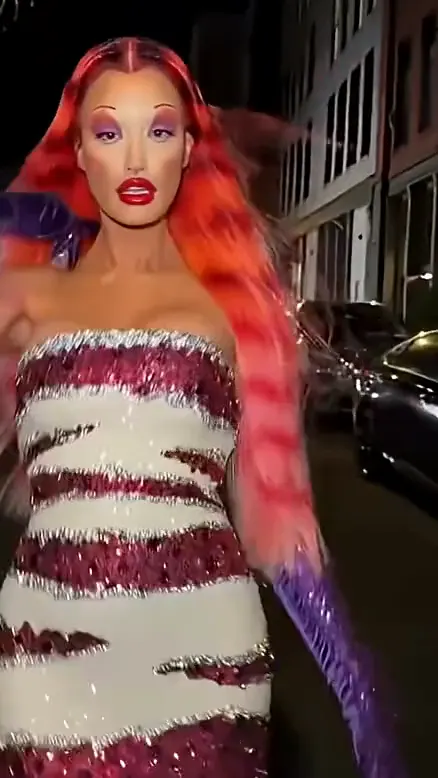
This sample is a ramalama costume walk clip shared online: a low, shaky shot follows a sequined gown down a night street, then pulls back to the full look.
A Good Ramalama AI Trend Clip, Frame by Frame
Before launch we rendered 1 test clip for this page from a single selfie, and it came out usable on the first try in about 30 seconds. Our examples wall for this trend is still empty: the same-name YouTube Shorts we checked were either stitched-together stock footage or cartoons, and the one real version had captions and shopping links burned into the frame. The frames below come from a real Ramalama AI trend clip shared online, so you can see each beat of the walk.
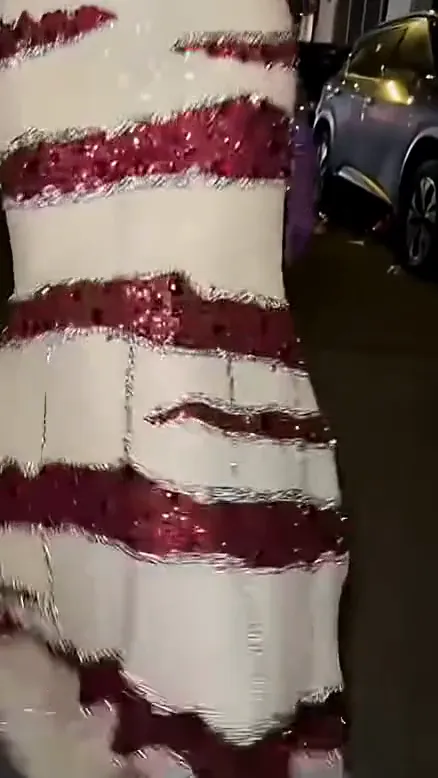
At 1 second, the camera stays low and close on the gown. The face is hidden, which builds the tension before the reveal in this Ramalama AI trend clip.
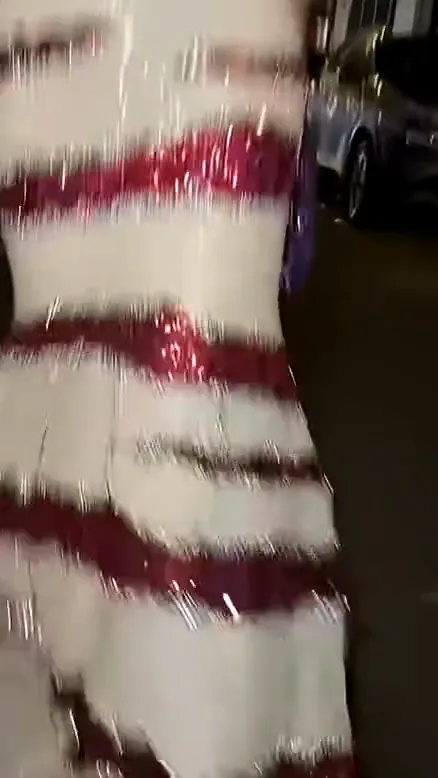
By 3.2 seconds, the gown still fills the frame and the street slides past behind it. Holding the low shot this long makes the reveal hit harder.
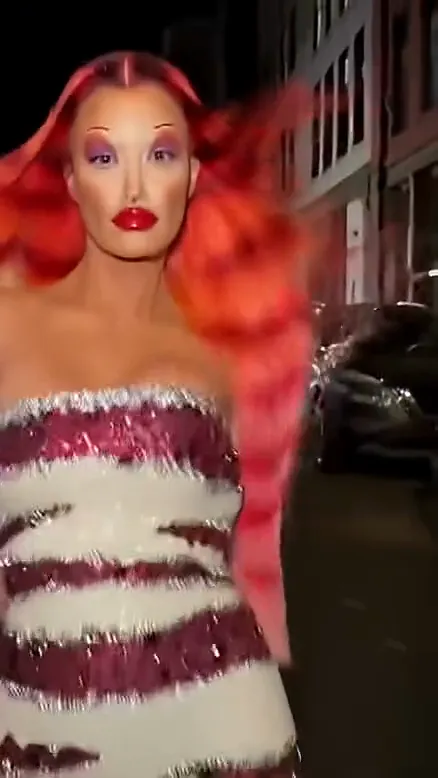
At 4.2 seconds, the camera pulls back and the full costume appears: long red hair, bold red lips and the strapless sequined gown.
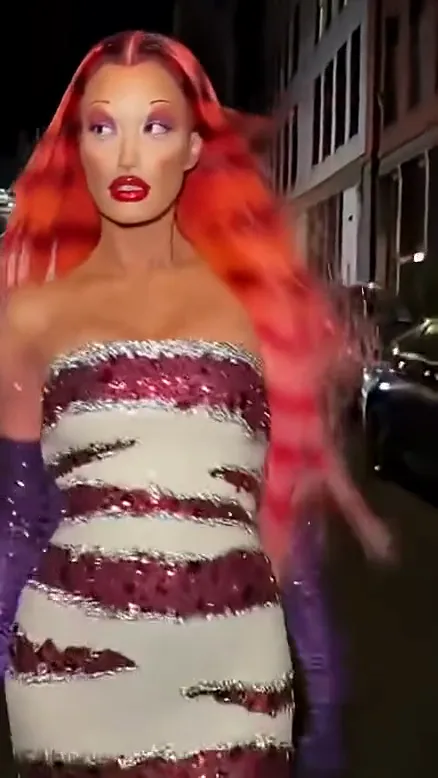
Our own pre-launch test used a selfie of a red-haired woman with the Witch chip.
In that 5-second witch test, the first two seconds stay low on the pointed black boots walking toward the camera with no face in frame, then a hard cut shows the full witch look — tall hat, black robe, purple-lined cape — on a jack-o’-lantern street, and the red hair and face from the selfie stay recognizable through the hair flip; the one miss was that the music’s big hit did not land exactly on the cut.
To see how your own selfie turns out, try the Ramalama Halloween costume video tool.
Why There Is No Celebrity Version of the Ramalama AI Trend
You will not find official celebrity clips inside the Ramalama AI trend generator. In the Ramalama AI trend, photos of celebrities or public figures are not allowed. You may only process photos of yourself or friends who gave clear permission.
In addition, the original track and its recording artists do not power the tool. Every Ramalama AI trend video features an original instrumental dance beat with a heavy kick, created specifically for this generator. You can test your own allowed portrait in the Ramalama Halloween clip generator.
Ramalama AI Trend Tools and Prices Compared
Here is what the Ramalama AI trend costs on Ricebowl. You need to sign in to generate. New accounts get 8 credits once per device and network. A 5-second video costs 20 credits, so the 8 free credits are not enough for a video. A 10-second video costs 40 credits. Paid plans start at $7.99 a month for 200 credits.
| Tool | Photos | Length | Price | Song included | Refund on fail | Read on |
|---|---|---|---|---|---|---|
| Ricebowl | 1 (one person, a duo or a group in the same photo) | 5 s or 10 s, 9:16, 768p | 20 credits per 5 s clip, 40 credits per 10 s clip; new accounts get 8 free credits (not enough for a clip); plans from $7.99/month for 200 credits | Original instrumental dance beat, no vocals (not the trend’s song) | Yes, credits refunded automatically | 2026-10-11 |
| Genjutsu AI | 1 (one person, face clearly visible; JPG, PNG or WebP up to 10 MB) | 15 s, 9:16, HD | 50 credits per video; cheapest way to make one is the $19.90 credit pack (50 credits = one video), or the Starter plan at $14.90/month for 70 credits | Soundtrack included on every template; whether it is the trend’s song is not stated | Yes, failed videos are refunded in credits automatically | 2026-10-11 |
| Media.io | 1 (JPG, PNG or JPEG; solo, duo or group photo) | Not stated (the demo clip in the tool runs 10 s), 9:16 | Credits per clip Not stated; free plan with daily free credits; Premium from $13.99/month billed yearly for 600 credits/month (shown at 50% off the $27.99 monthly price) | Not stated (the page says to attach the trending sound yourself on TikTok or Instagram) | Not stated (only a 7-day money-back guarantee on subscriptions) | 2026-10-11 |
| Dreamina (image-to-video, you write the prompt) | Not stated (Image to Video mode; the Ramalama page offers text prompts only, no costume-walk template) | Not stated | Credits per clip Not stated; Basic plan SGD 20/month for 2,021 credits (price shown in SGD for the browser’s region) | Not stated (the page says to keep music rights separate) | Not stated | 2026-10-11 |
Prices were read on 2026-10-11 and may change.
Ricebowl delivers a 768p 9:16 Ramalama AI trend clip from one photo for 20 or 40 credits, includes an original kick-heavy dance instrumental, and automatically refunds credits if a technical error occurs. Genjutsu AI charges 50 credits per 15-second HD video, with options for a $19.90 one-time credit pack or a $14.90 monthly plan for 70 credits. Media.io offers daily free credits or a $13.99 monthly plan billed yearly, but its Ramalama page notes you should add trending music manually on TikTok or Instagram. Dreamina offers prompt-based video generation starting at SGD 20 monthly for 2,021 credits, but its page provides text prompts rather than a ready-made costume template. Check the full list of credit packs and plans to pick the right option, or head over to the Ramalama Halloween AI video generator to test your photo.
Ramalama AI Trend Prompt Ideas You Can Copy
When you run the Ramalama AI trend on Ricebowl, the generator handles the complex settings behind the scenes. You never need to write or adjust text prompts. If you experiment with third-party image-to-video software that requires manual instructions, you can borrow these exact templates.
Here is the exact prompt configured for the 5-second Witch costume:
One reference image. Exactly the same number of people as in reference image 1 appear in the whole video: every person in reference image 1, no one added and no one missing, each with the same face, hair and build as in reference image 1 in every shot; never swap or merge faces. Only the clothes change, into a Halloween costume. [Shot 1] Extreme low-angle close-up at ground level, vertical: only the feet of every person in reference image 1 in pointed black witch ankle boots, walking straight toward the camera in step with the beat on a quiet residential street at night with jack-o'-lanterns glowing on the doorsteps, the background blurred. No faces in this shot. [Shot 2] At 00:02.000, hard cut exactly on the beat drop: low-angle vertical full-body shot on a quiet residential street at night with jack-o'-lanterns glowing on the doorsteps. Every person in reference image 1 wears the same pointed black witch ankle boots and a classic Halloween witch costume: a tall pointed black witch hat and a long flowing black robe with a dark purple cape. Every person in reference image 1 strides confidently toward the camera and flips the hair with a sharp toss of the head on the beat. Warm streetlights in front of the walkers light every face, and each face is bright and clearly visible. No other people besides the people in reference image 1, no text, no logos, no brand names. Audio: punchy electronic dance track with a heavy kick drum and a big beat drop exactly on the cut, instrumental only, no lyrics, no dialogue.Here is the built-in instruction used for the 5-second Vampire costume:
One reference image. Exactly the same number of people as in reference image 1 appear in the whole video: every person in reference image 1, no one added and no one missing, each with the same face, hair and build as in reference image 1 in every shot; never swap or merge faces. Only the clothes change, into a Halloween costume. [Shot 1] Extreme low-angle close-up at ground level, vertical: only the feet of every person in reference image 1 in polished black pointed boots, walking straight toward the camera in step with the beat in a long gothic stone corridor with tall arches, candelabras along the walls and a red carpet down the middle, the background blurred. No faces in this shot. [Shot 2] At 00:02.000, hard cut exactly on the beat drop: low-angle vertical full-body shot in a long gothic stone corridor with tall arches, candelabras along the walls and a red carpet down the middle. Every person in reference image 1 wears the same polished black pointed boots and an elegant vampire costume: a long black high-collar cape with red satin lining over a dark Victorian outfit, pale vampire makeup and small fangs. Every person in reference image 1 walks down the red carpet toward the camera like a runway model and swings the cape open on the beat. Warm candlelight from the candelabras falls on every face, and each face is bright and clearly visible. No other people besides the people in reference image 1, no text, no logos, no brand names. Audio: punchy electronic dance track with a heavy kick drum and a big beat drop exactly on the cut, instrumental only, no lyrics, no dialogue.To adapt a Ramalama AI trend prompt for external tools, follow these guidelines:
- Always specify “every person in reference image 1” rather than gender pronouns to maintain consistent facial features across shots.
- Adjust one environmental detail at a time so your generator keeps the walking rhythm intact.
- Re-run an identical prompt once if the first output has minor artifacts before altering your source image.
Note that only the Witch prompt was test-rendered by us before release. You can make a Ramalama Halloween video from one photo without entering any prompt text manually.
Before You Post Your Ramalama AI Trend Video
Keep these essential operational checks in mind before sharing your Ramalama AI trend video online:
- System errors refund your credits automatically, so you can re-run a job if processing fails.
- Upload only photos of yourself or friends who explicitly agreed to be featured in the Ramalama AI trend.
- Photos of celebrities or public figures are not allowed.
- Videos made on accounts without an active paid subscription can appear publicly in the community Explore feed.
- Make sure your source picture is free of commercial logos or clothing brand marks.
- Add an AI-generated content label to your post when publishing your finished render to TikTok, Instagram Reels, or YouTube Shorts.
If you want other meme formats, explore our guides on how to do any AI trend. You can also transform your portrait with Pumpkin Head AI, tell a spooky story through the Zombie AI Trend, create an amusing dance clip via the Jawn Dance AI Video Generator, produce an outdoor scene with the Gas Station Dance, or build complete choreography on the AI Dance Generator.
Sources
- Prices: Ricebowl, Genjutsu AI, Media.io, Dreamina, read 2026-10-11.
- Search results and related searches: Google US, read 2026-10-11.
- Search interest: Google Keyword Planner and Google Trends (US), read 2026-10-09.
- Own data: Ricebowl test render and sample clip frames, read 2026-10-11.
- Same-name YouTube Shorts check: read 2026-10-09.