Put a Ring on It Dog AI Trend: Origins and How to Make One
Published October 11, 2026 · Updated October 12, 2026
TL;DR: The Put a Ring on It Dog AI Trend in 60 Seconds
- A pet sits upright on a dark studio floor while two backup dancers move behind it.
- Every clip in the put a ring on it dog ai trend is AI-generated and first surfaced in late September 2026.
- You need one clear photo of one pet to render a vertical video.
- The Stage and Dancers style puts the animal front and center, while Solo Spotlight features only the pet under a light.
- A 5-second clip costs 20 credits, while a 10-second clip costs 40 credits, and new accounts receive 8 credits upon registration, which is not enough for one clip.
- The fastest route is to use the Ricebowl tool page directly in your browser.
Put a Ring on It Dog AI Trend Origin: Where the Stage Dog Came From
According to Google Trends data worldwide over the last 30 days read on 2026-10-09, search interest sat at zero until 2026-09-24. The term logged its first non-zero search volume on 2026-09-25, reached its highest peak on 2026-10-03, and dropped to about one-fifth of that peak by 2026-10-08. Nobody can point to one original creator as the single source of the format.
In the put a ring on it dog original clip, a dog stays seated on a reflective stage and tilts its head in time with the rhythm. The music in these viral uploads is an R&B pop hit from the late 2000s. A typical post shows a vertical phone video with stark black-and-white studio lighting, two dancers in plain dark outfits, and an animal looking straight ahead. The put a ring on it dog ai trend spread rapidly across short-video feeds as pet owners copied the studio aesthetic.
Is the Put a Ring on It Dog Real? AI Clips, Not a Trained Dog
The viral video shows an AI creation rather than a trained dog performing real choreography. No animal was trained for these clips, and the head nods and tilts are generated frame by frame. Several other pet clips share similar wording but have nothing to do with this format:
- A dog ring bearer walking down an aisle at a real wedding ceremony with rings.
- News stories about curious dogs that swallowed a ring and visited an animal clinic.
- A doorbell camera clip where automated voice prompts talk to an animal outside.
- A dog-wedding-ring comedy skit acted out by human owners using household props.
- Real-life dog dance competitions where trained animals perform heelwork routines beside human handlers.
If you prefer humans dancing on camera instead of synthetic pet movements, try the AI Dance Generator to turn full-body people pictures into dance videos.
Shot List: Which Photo Goes Where
You only upload one photo of one pet to act as the primary star. In Stage and Dancers on a put a ring on it dog maker, your pet sits center stage while two backup dancers wave one hand in sync. In Solo Spotlight, the dancers disappear completely, leaving your animal alone beneath a single white spotlight. Choosing the 10-second version adds an extra head dip, upward lift, and final direct look into the lens.
If you want a deadpan side-to-side sway rather than this dark stage setup, check out the Jawn Dance AI template.
Here is a frame from a put a ring on it dog clip shared online:
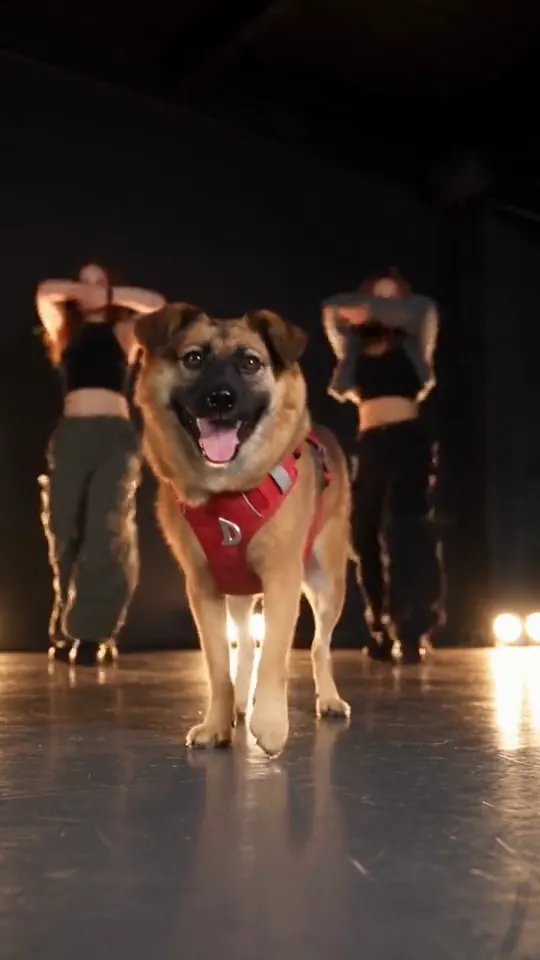
Our own pre-launch test used a golden retriever photo. In that 5-second test the golden retriever stayed seated on all four paws for the whole clip, with its fur color intact under the cold stage lights, while the two backup dancers behind it waved in sync; the one miss was that the dancers faced the camera instead of turning away into the shadows.
How to Do the Put a Ring on It Dog AI Trend in 3 Steps
Follow these simple steps to make your own put a ring on it dog ai trend video in your browser.
1. Upload one pet photo
Open make a put a ring on it dog video and pick one clear snapshot of your pet. Make sure the dog or cat faces forward in good light with no people in the frame.
2. Pick a style and a length
Choose Stage and Dancers or Solo Spotlight on the put a ring on it dog maker. Select 5 seconds for 20 credits or 10 seconds for 40 credits.
3. Render, download and post
Click generate to let the MiniMax H3 model process the visual, then save the 768p MP4. Always label the upload as AI-made when sharing, or read how to do any AI trend for other viral formats.
This trend clip shared online shows the stage setup: a tan dog in a red harness center stage, tilting its head to the beat with dancers behind it.
Before launch we rendered 1 test clip for this page from a single pet photo, and it came out usable on the first try in about 30 seconds.
Put a Ring on It Dog AI Trend Meme Clips, Frame by Frame
All 5 examples on our tool page are trend clips other people posted, trimmed to their last 10 seconds, and only one of them, an AI-made version, puts a cat on stage, as a backup dancer.
Studying real community examples shows how closely each put a ring on it dog meme matches the underlying generation styles. If you like structured multi-character skits, compare this look with the Alors On Danse AI Meme template.
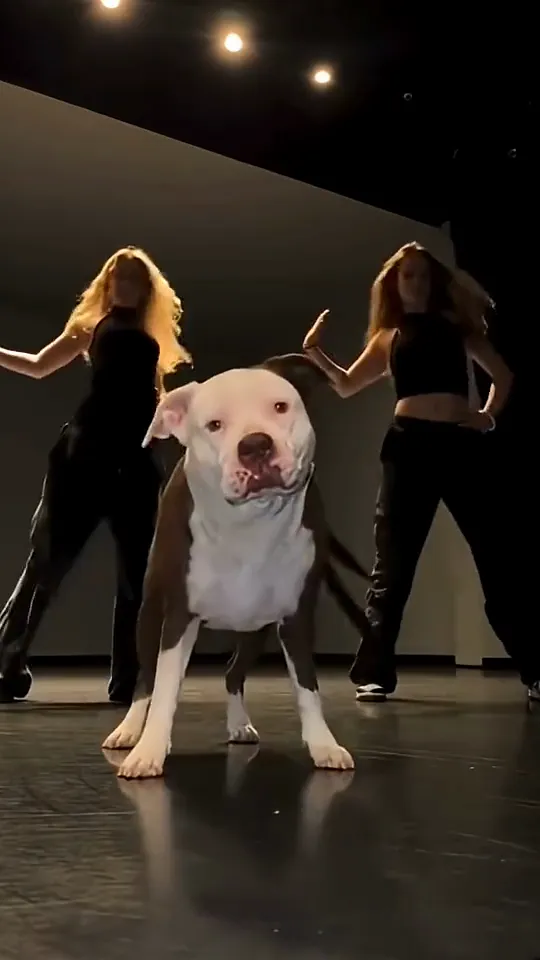
This frame captures a pit bull in the center of a dark studio tilting its head firmly to one side. The motion lines up with the core head tilt of the Stage and Dancers mode on dog dance AI.
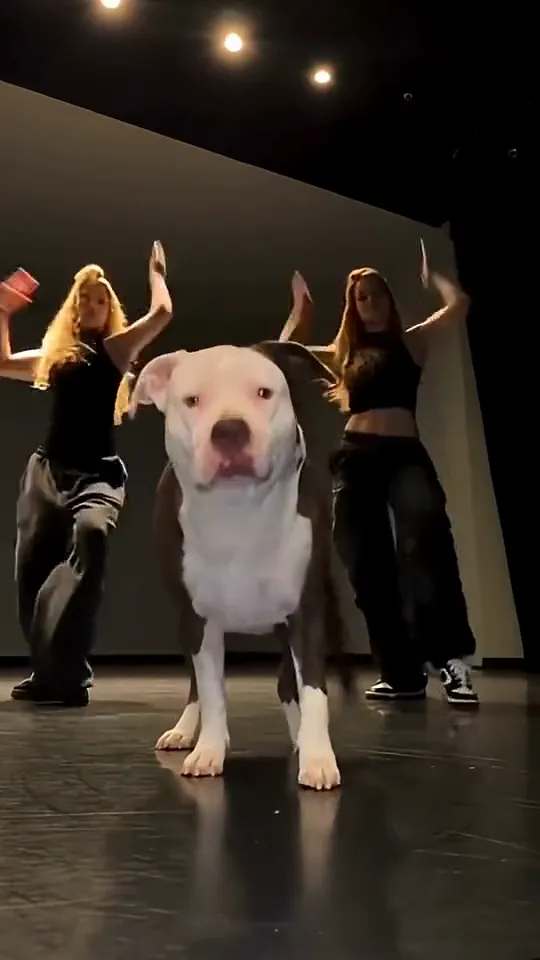
Here the same dog faces forward while both dancers in black bodysuits raise their hands at the exact same moment. The synchronized gesture matches the signature background choreography in our Stage and Dancers option.
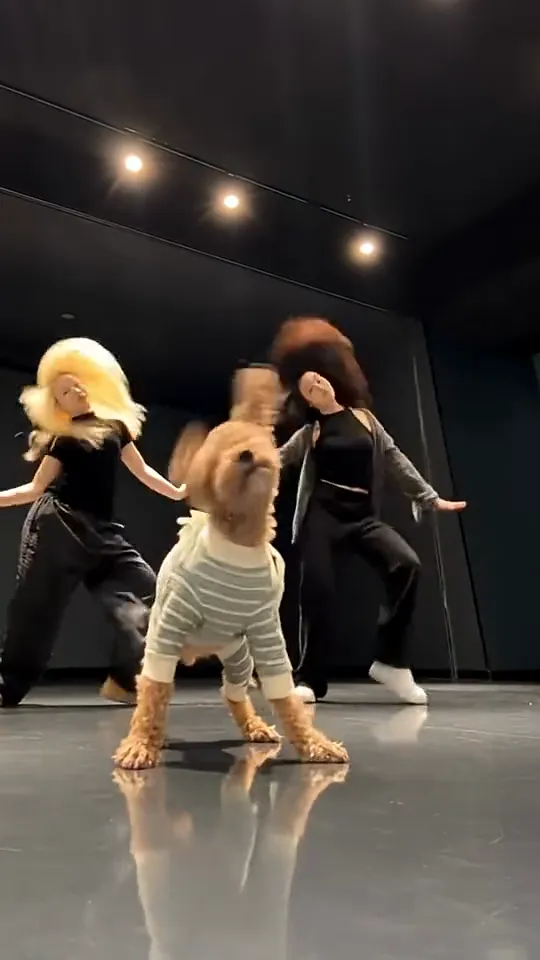
A brown toy poodle in a striped sweater drops its head toward the polished reflective floor while the dancers move behind it. This sequence matches the dip-and-rise head action found in the 10-second render length.
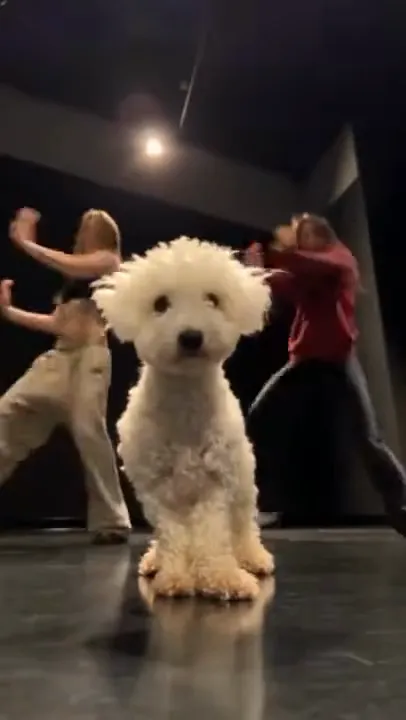
A white curly-haired dog sits facing the camera from a low angle on the floor as two human figures move in the background. The low perspective and steady forward gaze match the low camera angle that every Ricebowl style uses.
Why There Is No Celebrity Version of This Trend
You may wonder if you can put a famous public figure on the stage floor. You cannot produce a celebrity version of the put a ring on it dog ai trend because the system only accepts photos of pets. The tool is built for pet photos and asks for no people in the picture, and the two background dancers are generic computer-generated figures with their faces hidden in shadow rather than real performers. The audio track is an original instrumental without vocals, so no official singer edition exists. If you want a party scene with human characters under luxury chandeliers, look at the Burning Bridges Video tool instead.
Put a Ring on It Dog AI Trend Tools Compared
Pricing and feature details were read on 2026-10-11 and may change over time.
| Tool | Photos | Length | Price | Song included | Refund on fail | Read on |
|---|---|---|---|---|---|---|
| Ricebowl | 1 (a dog or cat) | 5 s or 10 s, 9:16, 768p | 20 credits per 5 s clip, 40 per 10 s; new accounts get 8 free credits (not enough for one clip); paid plans from $7.99/month for 200 credits | Original instrumental beat, no vocals (not the trend’s original song) | Yes, credits are refunded automatically | 2026-10-11 |
| Starrd | 1 | 19 s, 9:16 | 150 credits per video (about $7); packs from $4.99 for 100 credits, $11.99 for 300 credits, one-time, credits do not expire; the cheapest pack does not cover one video | Yes | Not stated (terms say credits are used on submit regardless of output quality, purchases final) | 2026-10-11 |
| put-a-ring-on-it-ai.app | 1 | 19 s, 9:16 | 600 credits per 480p video (720p 1,500; 1080p 2,500); $9.90 one-time pack for 600 credits | Yes, the trend’s original song audio | Yes, a failed task’s credits are returned | 2026-10-11 |
| Flowlio AI | 1 | 19 s, 9:16 | 500 credits per 480p video on the trend sale (was 700; 720p 1,500; 1080p 3,800); $4.90 one-time trial pack gives 500 credits; Starter $13.30/month billed yearly | Yes, original sound | Yes, credits are returned automatically when a generation fails (credit refund, not money) | 2026-10-11 |
| Motion Transfer | 1 | About 19 s, vertical | Per-clip cost only shown after sign-in (Not stated); 18 free sign-up credits; Starter $8.30/month billed yearly ($100/year, 2,400 credits) | Yes, the reference soundtrack | Yes, failed or undelivered tasks are not counted as used credits (contact support if a deduction is not corrected) | 2026-10-11 |
| Media.io | 1 pet photo plus your own reference clip | Depends on the model | Free daily credits; Premium $13.99/month billed yearly ($27.99 month-to-month), 600 credits/month, up to 60 videos | Not guaranteed, audio varies by model | Not stated for failed generations (7-day refund window; consumed credits are non-refundable) | 2026-10-11 |
Other single-photo trend tools make about 19-second clips with the trend’s original song audio, sold through credit packs such as 600 credits for one 480p video on put-a-ring-on-it-ai.app or 500 credits on Flowlio AI, while Media.io requires your own reference clip alongside a pet photo. Ricebowl makes a basic 5-second dog dancing video for 20 credits; new accounts get 8 sign-up credits, which is not enough for one clip, and paid credit plans start at $7.99 monthly. Other options like Starrd offer 19-second runs for 150 credits (about $7), but their cheapest $4.99 pack provides 100 credits and does not cover one video. For road-trip outdoor visuals instead of dark studio stages, you can try the Gas Station Dance generator.
Put a Ring on It Dog AI Trend Prompt Ideas You Can Copy
On Ricebowl you never type a manual text prompt because the pipeline uses a fixed underlying script. If you use external image-to-video platforms, copy the exact instructions below.
Stage and Dancers, 5 seconds:
One reference image of one pet. The pet in reference image 1 is the star of the video, with the same face, same fur colors, same markings and same body as reference image 1 in every frame. A dark, empty TV studio stage with cool, high-contrast black-and-white stage lighting with silver-white highlights, a black backdrop and a glossy black floor that reflects the light. Two backup dancers in plain black long-sleeve bodysuits stand side by side a few steps behind the pet in reference image 1, faces turned slightly away and kept in soft shadow, slightly out of focus. The pet in reference image 1 sits upright in the middle of the stage with all four paws on the floor, like a real animal, the whole time. The pet in reference image 1 nods the head sharply on every beat, then tilts the head to one side and back to the other side. Behind the pet in reference image 1, both backup dancers wave one raised hand left and right in perfect sync on the beat. Vertical phone-video shot, low camera angle from the floor of the stage, static camera, the whole body of the pet in reference image 1 in frame, the face of the pet in reference image 1 clearly lit and in sharp focus. Clean, sharp music-video look. No other animals, and no people other than the two backup dancers. No text, no logos, no brand names. Audio: upbeat R&B pop beat with sharp handclaps, snappy snare drums and a bouncy bassline, instrumental only, no lyrics, no dialogue.Solo Spotlight, 5 seconds:
One reference image of one pet. The pet in reference image 1 is the star of the video, with the same face, same fur colors, same markings and same body as reference image 1 in every frame. A dark, empty stage in total darkness except for one bright white spotlight shining down from above onto the pet in reference image 1, a glossy black floor reflecting the circle of light, cool black-and-white tones with silver-white highlights. The pet in reference image 1 sits upright in the middle of the stage with all four paws on the floor, like a real animal, the whole time, inside the circle of the spotlight. The pet in reference image 1 nods the head on every beat, then tilts the head to one side and back, and at the end looks straight into the camera. Vertical phone-video shot, low camera angle from the floor of the stage, static camera, the whole body of the pet in reference image 1 in frame, the face of the pet in reference image 1 clearly lit and in sharp focus. Clean, sharp music-video look. No other people and no other animals in the scene. No text, no logos, no brand names. Audio: upbeat R&B pop beat with sharp handclaps, snappy snare drums and a bouncy bassline, instrumental only, no lyrics, no dialogue.- Refer to the animal as “the pet in reference image 1” rather than using pronouns.
- Keep the closing audio sentence intact to lock the rhythm.
- Adjust one detail at a time, noting that only Stage and Dancers has a test render while Solo Spotlight is untested.
To generate a clip using built-in system parameters instead of manual prompts, check out the put a ring on it pet video tool.
Before You Post Your Put a Ring on It Dog AI Trend Clip
Keep these rules in mind before you export and upload your clip:
- Failed generations return spent credits back to your account automatically.
- Only upload a photo of your own pet or an animal you have permission to use, and keep people out of the picture.
- Clips on accounts without an active paid subscription can appear in the public Explore feed.
- Always add a label marking your post as AI-made.
- The built-in music cannot be muted or replaced inside the tool, so add any preferred sound in your external app.
- The tool exports in vertical 768p MP4 format and does not support GIF exports.
You can create your own clip right now on put a ring on it AI video.
Sources
- Frames: YouTube Shorts posts VohmQBU3p2I (frames 1 and 2) by @GLnails20, fxqEBtYAfn0 (frame 3) by @myfluffy_official, and 77CAkDjH-Aw (frame 4) by @petersong_4995, read 2026-10-11.
- Prices: Ricebowl, Starrd, put-a-ring-on-it-ai.app, Flowlio AI, Motion Transfer and Media.io pricing and refund pages, read 2026-10-11.
- Search interest: Google Trends worldwide, last 30 days, read 2026-10-09. Test clip and example counts: Ricebowl internal test log and tool page examples, read 2026-10-11.