How to Do the Head Bop Animation: Moves and Photo Guide
Published October 14, 2026
TL;DR
- The trend is a looping vertical clip set to a phonk cowbell beat where you nod hard, shrug, and snap at the lens.
- You can learn the five basic moves and film the real version in about 15 minutes.
- You can also skip filming, upload 1 or 2 photos to the Ricebowl head bop animation tool, and get a finished 9:16 video.
- The tool costs 20 credits for a 5 s clip and 40 credits for a 10 s clip; new accounts get 8 credits once, which is not enough for one video, while paid packs offer 1 video for $8.99, 3 videos for $18.99, or 5 videos for $28.99 on the pricing page.
What Is the Head Bop Meme?
If your feed feels full of blank-faced people bobbing side to side, you have seen the head bop meme. The format is simple. A person stands in front of a dark backdrop, hits a couple of fast poses on a phonk cowbell beat, and settles into a steady, hard nod. The face stays completely neutral the whole time.
The style spreads fast because anyone can copy it in an afternoon. The video runs on an endless loop, matches almost any dark room, and works just as well for pets as it does for humans. Clip pages do not state any single origin for the trend, but thousands of people recreate the loop every day.
Not the Same As Other Head Videos
A head bop clip is distinct from typical synthetic portrait clips. It is not an automated talking-head avatar reading lines from a script. It is also not a digital face swap placed on someone else’s body. The subject in the video performs distinct physical gestures on a fast beat. If you want full-body choreography instead, check out the AI dance generator or the Thriller dance AI video workflow. The head bop keeps things focused strictly on shoulders, posture, and facial timing.
The Five Head Bop Moves
Before learning how to do the head bop animation in front of your camera, you need to understand the rhythm. The sequence fits neatly into a standard four-beat loop. Keep your shoulders loose, keep your eyes on the lens, and keep your face blank.
| Move | What your body does | Count |
|---|---|---|
| 1 Lean Back | Shift your weight onto your back foot, drop your shoulders slightly, and tilt your head back | Beat 1 |
| 2 Snap Forward And Point | Snap your head toward the camera, drop your weight forward, and point one index finger right at the lens | Beat 2 |
| 3 Shrug | Pull both shoulders straight up toward your ears and drop them quickly | Beat 3 |
| 4 Beat Nod | Drop your chin down hard on the bass kick, then rebound slightly upward | Beat 4 |
| 5 Deadpan Hold | Keep your eyes locked forward, hold your chin steady, and do not smile or blink | Beat 1 of loop |
Once you understand the count, learning how to do the head bop animation takes very little practice.
Head Bop Animation Tutorial: Film It Yourself in 15 Minutes
This head bop animation tutorial walks you through recording your own video in your room with basic lighting and a phone.
- Hang a dark curtain or stand right in front of a plain flat wall, then set a soft light source directly in front of your face so your features stay sharp.
- Rehearse the first two beats without music until you can lean back on count one, snap forward on count two, and stop your movement instantly.
- Add the shoulder shrug on count three, then practice the hard chin nod on count four while keeping your facial expression completely blank.
- Mount your phone vertically in 9:16 ratio locked off at chest height, step back so your head and upper chest fill the screen, and record two clean loops without moving the camera.
- Bring the recorded video into TikTok or an editor like CapCut, line up the heavy phonk bass kick right where your finger points, and trim the start and end so it loops cleanly.
If you enjoy learning modern internet trends step by step, our broader guide on how to do the AI trend covers similar formats. If you prefer to skip the physical acting entirely, you can switch to the Ricebowl head bop animation tool to make a clip from still photos.
How to Do the Head Bop Animation From One Photo
You do not have to perform the routine on camera to join the trend. If you want to know how to do the head bop animation using software, follow these steps inside the Ricebowl web tool.
- Open the head bop animation tool and upload 1 clear front-facing photo of yourself, a friend, or your pet, with an optional 2nd photo if you want multiple characters side by side.
- Select one of the 8 visual presets from the style menu to choose your background, wardrobe accents, and staging.
- Choose your clip duration by selecting either the 5 s option or the 10 s option.
- Click generate to start the video processing task on the server.
- Wait a few minutes for the render queue to finish, preview the movement, and download your 9:16 vertical 768p MP4 file.
Here is how each of the 8 available styles sets up the scene:
| Look Preset | Description and Staging |
|---|---|
| Curtain Bop | The classic default setup with a dark satin backdrop and centered framing |
| Wig and Shades | Adds thick dark glasses and long hair strands framing the face |
| Pet Row | Places animal faces side by side bobbing on the exact same beat |
| Family Row | A multi-subject row suited for the AI family video workflow |
| Gym Bop | A plain gym wall background with a subtle flex and chin tilt |
| Bedroom Bop | A casual bedroom setting with ambient wall light behind you |
| Hallway Bop | Narrow hallway framing with directional ceiling lighting |
| Pet Solo | A tight single-animal portrait focused directly on the pet’s face |
In the two row looks, your upload layout changes based on your file count. When you upload 1 photo, that subject appears in the center of the frame. When you upload 2 photos, photo 1 sits on the left, photo 2 sits in the middle, and the system generates an additional stranger or pet on the right to complete the trio. This setup makes knowing how to do the head bop animation easy even if you only have one clean snapshot.
The clip below is a sample shared online that shows the trend in a single take.
Real Head Bop Clips, Frame by Frame
Studying clips that perform well on social feeds shows why the trend works. For this guide we looked at 8 candidate clips shared online, kept 3, and set 5 aside because they were not the head bop or showed a talking avatar. Here are five notable visual frames from the community and how you can replicate them with the Ricebowl head bop animation tool.
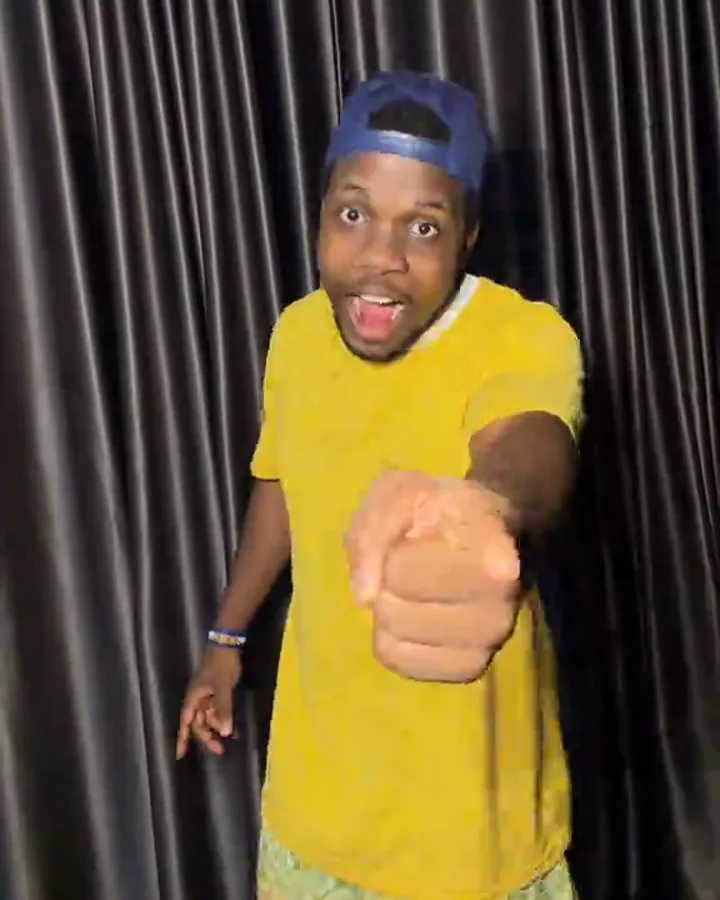
A man in a yellow T-shirt and blue cap leans forward in front of a dark satin curtain, pointing a finger at the lens with his mouth slightly open. This frame captures the sudden snap that gives the dance its punch. It matches the Curtain Bop setting perfectly. Knowing how to do the head bop animation with high contrast clothes makes the finger point pop.
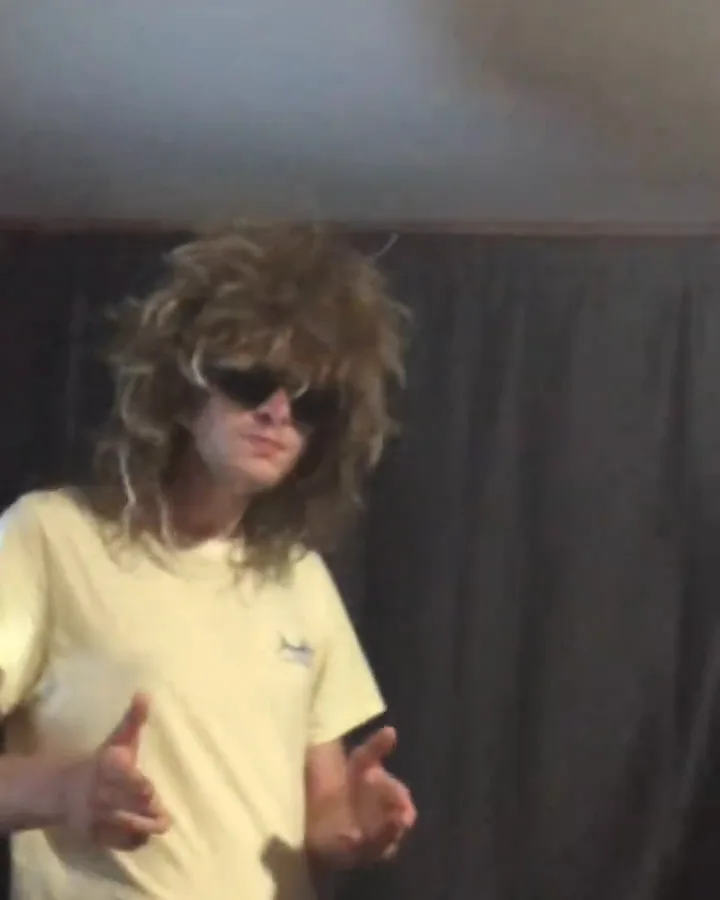
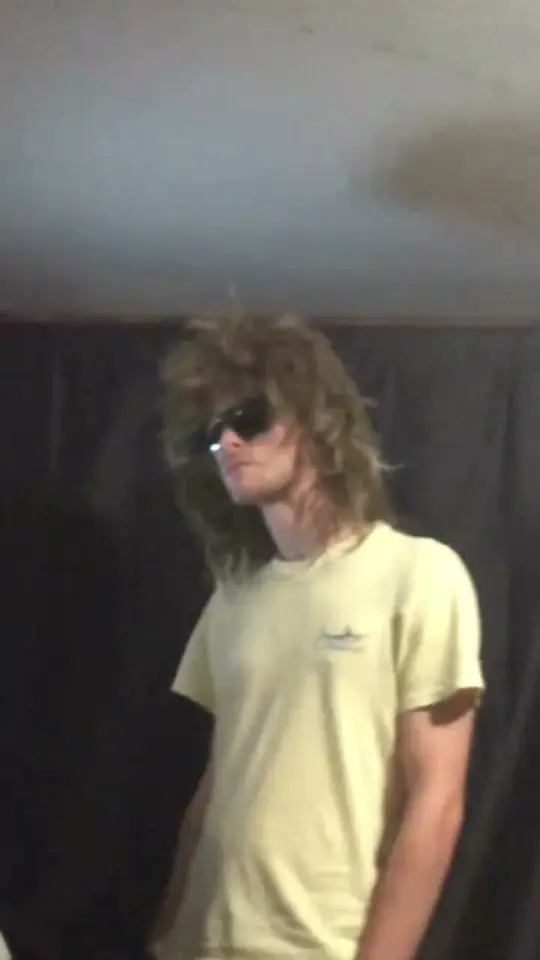
A person wears a long dark wig and oversized dark sunglasses, throwing finger guns toward the lens in front of a dark curtain. The extra props hide minor eye movements and make the deadpan face look even stiffer. This exact aesthetic matches the Wig and Shades preset inside the head bop animation tool.
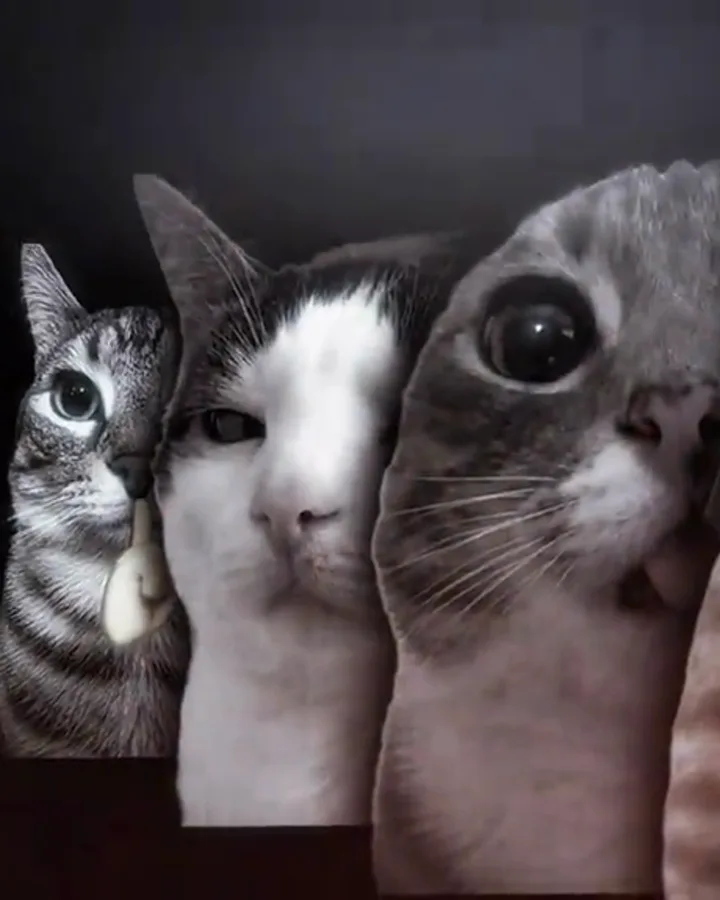
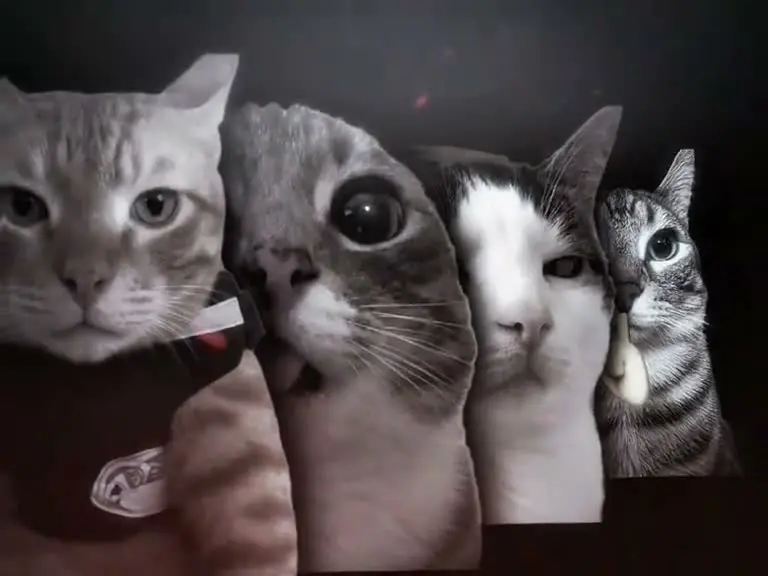
Three cats sit shoulder to shoulder in a black and white close-up frame, nodding their heads down on the rhythm. Animal clips often perform best when the rhythm is stiff and mechanical. The visual directly reflects the Pet Row option, which fans of the viral put a ring on it dog format will recognize immediately.
A subject in a long wig, sunglasses, and a pale yellow shirt tilts their chin upward in front of a dark curtain. The upward tilt provides an alternative recovery move before the main downward beat nod hits. This variation shows another way how to do the head bop animation without changing your basic background setup.
Four cats appear in an even horizontal line across a dark backdrop, snapping down in synchrony on the heavy cowbell accents. If you enjoy playful animal renders like Knight Cat AI, this framing delivers that same humor. It relies on the multi-subject Pet Row layout to keep viewers watching the loop.
Why There Is No Celebrity Version
Many users ask how to do the head bop animation featuring public figures, but the system does not support celebrity generations. The Ricebowl engine is built strictly around your personal uploaded photos. The software does not include celebrity face templates, does not accept prompts requesting famous likenesses, and does not draw from copyrighted pop audio. All audio tracks generated by the tool use an original instrumental beat, meaning you get a unique clip ready for personal customization.
Head Bop Animation Tools Compared
Before deciding how to do the head bop animation for your next post, compare the trade-offs between manual creation and automated photo tools.
| Tool | Photos | Length | Price | Song included | Refund on fail | Read on |
|---|---|---|---|---|---|---|
| Ricebowl | 1 or 2 (a row of three heads fills the other spots with generated faces) | 5 s or 10 s, 9:16, 768p | 20 credits per 5 s clip, 40 per 10 s clip; or pay once: 1 video $8.99, 3 videos $18.99, 5 videos $28.99. New accounts get 8 credits, not enough for a video | No, a generated phonk-style beat; add a sound yourself | Yes, credits returned automatically | 2026-10-14 |
| Kavel AI | 1 to 4 | 10 s, 9:16 | 360 credits per clip at 480p, 770 at 720p | Not stated | Not stated | 2026-10-14 |
| CapCut template | Not stated | Not stated | Not stated | Not stated | Not stated | 2026-10-14 (search results only) |
| Wondershare | Not stated | Not stated | Not stated | Not stated | Not stated | 2026-10-14 (search results only) |
| Pippit | Not stated | Not stated | Not stated | Not stated | Not stated | 2026-10-14 (search results only) |
| Media.io | Not stated | Not stated | Not stated | Not stated | Not stated | 2026-10-14 (search results only) |
Look closely at the real cost per finished clip before choosing your approach. A manual template app requires you to film and align your own physical takes, while automated generators produce ready-to-share media directly from still files.
Prompts You Can Copy
When generating clips or testing prompt structures in comparable tools, these descriptive strings demonstrate how to do the head bop animation with clear scene constraints.
Curtain Bop, 1 photo, 10 seconds:
One reference image. The person in reference image 1 is the performer and keeps exactly the same face, hair, skin tone and build as reference image 1 in every frame. The person in reference image 1 wears the same clothes as in reference image 1. Standing in front of a dark curtain in a dim room, lit softly from the front. On the beat, the person in reference image 1 leans the head back, snaps forward and points a finger at the lens, shrugs both shoulders, then nods the head hard on every beat, with a deadpan face. One continuous take, no cuts, locked-off camera, framed from the chest up, vertical 9:16, the face of the person in reference image 1 lit and clearly visible. No text, no captions, no logos, no brand names, no watermark. Audio: a heavy phonk-style bass beat with a cowbell melody, steady drums and a low synth, instrumental only, no lyrics, no dialogue.Pet Row, 1 photo, 10 seconds:
One reference image. The pet in reference image 1 keeps exactly the same face, fur colour and markings as reference image 1 in every frame, still a real animal with real fur, not a cartoon. A row of three pets sits close together facing the lens: the pet in reference image 1 in the middle, with a different pet with a clearly different face on each side. In front of a dark curtain in a dim room, lit softly from the front. On the beat, all three pets lean the head back together, snap forward toward the lens, then nod the head hard on every beat, each one still a real animal. One continuous take, no cuts, locked-off camera, the whole row in frame from the ears down to the chests, vertical 9:16, the faces lit and clearly visible. No text, no captions, no logos, no brand names, no watermark. Audio: a heavy phonk-style bass beat with a cowbell melody, steady drums and a low synth, instrumental only, no lyrics, no dialogue.Curtain Bop, 2 photos, 10 seconds:
Two reference images. The person in reference image 1 and the person in reference image 2 are the two performers, each keeping exactly the same face, hair, skin tone and build as the matching reference image in every frame; never swap or merge faces. The person in reference image 1 and the person in reference image 2 each wear the same clothes as the matching reference image. Standing in front of a dark curtain in a dim room, lit softly from the front. On the beat, the person in reference image 1 and the person in reference image 2, side by side and in perfect sync, lean the head back, snap forward and point a finger at the lens, shrug both shoulders, then nod the head hard on every beat, with a deadpan face. One continuous take, no cuts, locked-off camera, framed from the chest up, vertical 9:16, the face of the person in reference image 1 lit and clearly visible. No text, no captions, no logos, no brand names, no watermark. Audio: a heavy phonk-style bass beat with a cowbell melody, steady drums and a low synth, instrumental only, no lyrics, no dialogue.You can adapt these descriptive prompts for almost any modern image-to-video platform to maintain consistent framing and movement.
Before You Post
Keep these practical points in mind before exporting and sharing your finished media:
- Failed generations return credits automatically to your account balance, so you never lose balance on an incomplete run.
- Only upload photos of people who have given you clear permission to use their picture.
- Avoid wearing shirts with prominent brand logos, bold graphic text, or busy patterns that can distort during synthetic motion.
- Toggle the AI-generated content label inside your TikTok or Instagram Reels settings before publishing your clip.
- The tool’s included audio track is original and instrumental, so check the Ricebowl head bop animation tool preview and add a licensed trending sound inside your social app if you want the specific phonk beat.
FAQ
What is a head bop meme?
A head bop meme is a vertical video format featuring a person or animal nodding stiffly to a heavy phonk rhythm. The creator maintains an unmoving expression while leaning, snapping, and shrugging directly at the camera. Its punchy timing and easy loop make it a staple on mobile video feeds.
Is it hard to learn how to do the head bop animation?
It is not hard to learn how to do the head bop animation once you break the movement into basic steps. Most people get the timing down after rehearsing the four-beat sequence a few times in front of a mirror. The hardest part is simply keeping your eyes focused and your facial muscles relaxed.
How long does it take to learn how to do the head bop animation?
It usually takes about 10 to 15 minutes of practice to learn how to do the head bop animation cleanly. You only need to memorize five core movements that fit into one musical bar. Once your muscle memory locks into the bass kick, you can record a clean take right away.
How to make a head bop animation without filming yourself?
You can discover how to make a head bop animation without filming yourself by uploading a portrait photo into an online generator. The automated tool animates your still face through the standard lean, snap, and nodding movements automatically. You receive a complete vertical video file without ever turning on your camera.
Can my cat do the cat head bop?
Yes, you can include your pet by uploading a clean portrait into the animal mode of the generator. The tool maps the rhythmic nod onto the pet’s head while keeping the rest of the image stable. It is the easiest way to recreate the cat head bop trend without stressing your pet.
How long does the AI version take and how long is the clip?
Generating a video through the online tool takes a few minutes from the moment you hit the render button. You can select an export length of either 5 seconds or 10 seconds depending on your chosen preset. Both lengths are designed to loop seamlessly on vertical social video feeds.
Do I need an editing app?
You do not need an editing app if you generate your clip using an automated web tool. You will need an editor or the built-in trimming tools on TikTok if you film the physical routine yourself. A separate video editor lets you align the visual hit cleanly against your chosen phonk music track.
Sources
- Kavel AI head bop animation page, read 2026-10-14
- Google results for “head bop animation”, read 2026-10-14
- CapCut, Wondershare, Pippit and Media.io head bop search results, titles only, read 2026-10-14