Hotel Lobby AI Trend: How It Works, Steps, and Prices
Published October 10, 2026 · Updated October 12, 2026
TL;DR: The Hotel Lobby AI Trend in 60 Seconds
- The hotel lobby ai trend turns two static portraits into a dynamic video of two performers rapping together in a solid orange booth.
- You need two solo photos: one clear front-facing picture for the left performer and one for the right performer.
- The left photo always appears on the left side of the screen, while the right photo always appears on the right side.
- The hotel lobby ai meme is not free: new accounts receive 20 credits, which is not enough to cover a single render.
- A 5-second video at 480p costs 50 credits, while a 5-second video at 720p costs 90 credits.
- The fastest path to join the hotel lobby ai trend is to make the hotel lobby AI trend video directly on Ricebowl.
Hotel Lobby Meaning: Where the Hotel Lobby AI Trend Came From
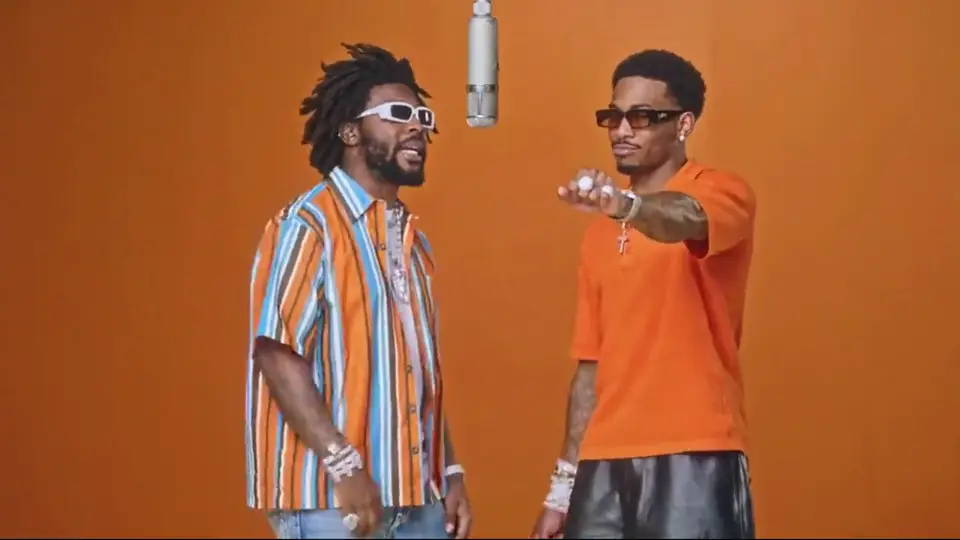
The hotel lobby ai trend started from a specific hip-hop video. The track is “Hotel Lobby (Unc & Phew)”, released in 2022 by Quavo and Takeoff, two members of Migos, who recorded together as Unc & Phew. The visuals come from their 2022 performance on A COLORS SHOW. In that clip, both performers stand in front of a plain solid orange wall with one microphone hanging from the ceiling between them, shot with a locked-off camera while the hotel lobby song plays. Ricebowl is not affiliated with the artists, Migos, or the COLORS show.
In late September 2026, the hotel lobby ai trend took off on TikTok. People began placing themselves, their partners, friends, family members, or pets into the orange booth using AI video tools. Google Trends US interest was near zero until about 2026-09-21 and peaked around 2026-09-25. The hotel lobby ai trend creates an entirely new video from your static photos rather than running a face swap over the original footage.
Online, people also call the hotel lobby ai trend the Migos AI trend, the COLORS AI trend, or the hotel lobby AI filter. If you search for the concept under its other viral name, you can visit the Migos AI page to find the same setup. The trend continues to spread across social feeds as more creators try the hotel lobby ai trend with their own pictures.
Hotel Lobby AI Trend vs Hotel Lobby Design and Other Look-Alikes
When searching for the hotel lobby ai trend, search engines often mix up completely different topics. Here is what the hotel lobby ai trend is not:
- It is not hotel lobby design or AI software used by hospitality companies to plan building interiors.
- It is not a video editing template inside an app where you simply paste clips over an existing edit.
- It is not just an audio sound bite or an upload of the track itself.
The hotel lobby ai trend is strictly an AI-generated rap video of two people trading bars in an orange studio.
Shot List for the Hotel Lobby AI Trend: Who Goes Where
Every clip in the hotel lobby ai trend follows a clear sequence of visual beats:
- Opening beat: Both people stand inside the frame from the very first second against a plain solid orange wall, with one microphone hanging between them.
- First verse: The person on the left leans toward the hanging microphone to deliver their lines.
- Second verse: The person on the right points toward the lens while taking their turn.
- Trading bars: Both performers take turns leaning into the center, gesturing with confident hand moves.
- Closing pose: The video ends with the microphone centered as each performer strikes their own distinct pose.
In every generation, the left photo becomes the person on the left side of the screen, and the right photo becomes the person on the right.
Here is how two standard portraits translate into the full scene:
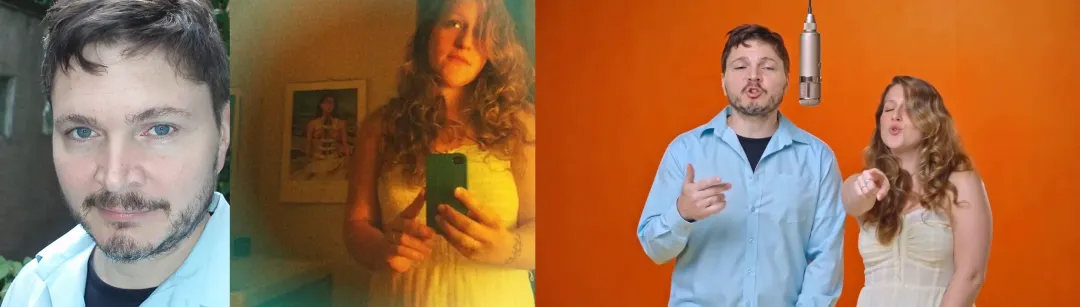
If you want the performers to swap positions in your hotel lobby ai trend clip, switch your two uploads before pressing the button.
How to Do the Hotel Lobby AI Trend in 4 Steps
Learning how to do the hotel lobby trend takes only a couple of minutes. Here is how to make hotel lobby ai video clips using your own images.
- Upload your left photo: Choose a clear, front-facing solo photo with good lighting showing head and shoulders. Head to the hotel lobby AI video generator and place this image into the left slot.
- Upload your right photo: Pick a matching solo photo of the second person, facing forward with clear lighting. Add it to the right slot on the page.
- Select your settings and generate: Choose your quality (480p or 720p), pick your length (5, 10, or 15 seconds, where 15 seconds is for subscribers only), pick your aspect ratio (9:16 portrait by default, or 16:9, 1:1, 4:3, 3:4, 21:9), and toggle sound on or off. Check the button to see the exact credit price, then click Generate to sign in and start your render.
- Download and share: The render takes about 2 to 3 minutes, so keep your browser page open while it processes. Once finished, download your MP4 file with no watermark and post your hotel lobby ai trend clip directly to TikTok or Instagram in 9:16 portrait format.
Between October 1 and October 9, 2026, people ran 71 generations on ricebowl’s Hotel Lobby AI tool, and 52 of them ended with a finished video. Of those 71 runs, 63 asked for a 10- or 15-second clip instead of the shortest 5-second option, and 55 were rendered at 480p.
The entire system relies on Ricebowl’s MiniMax H3 model, which automatically animates both figures so they trade rap verses around a single hanging microphone. If you want to put two people on one mic outside of this orange studio setup, explore the AI Rap Duo tool.
You can try the hotel lobby AI trend right now by loading your two photos into the generator.
A Good Hotel Lobby AI Trend Clip, Frame by Frame
To see how a clean generation should look, examine these four key beats from a finished video made on Ricebowl.
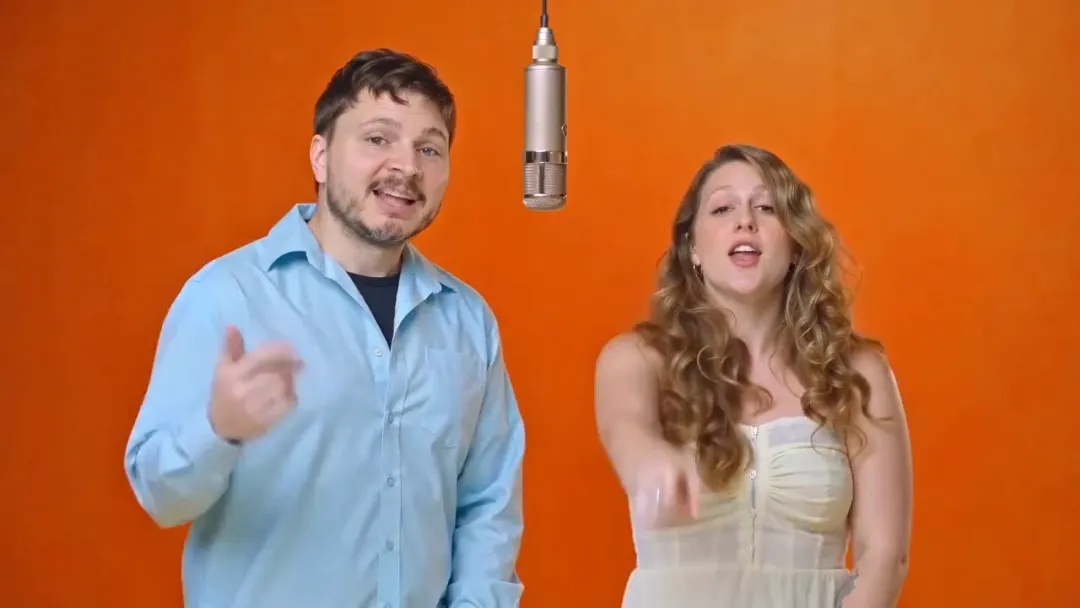
The opening frame establishes the iconic staging right away, showing both subjects inside the frame against the solid orange studio wall with the hanging microphone centered between them. This beat works best when both original photos feature clear head-and-shoulders framing with solid lighting.
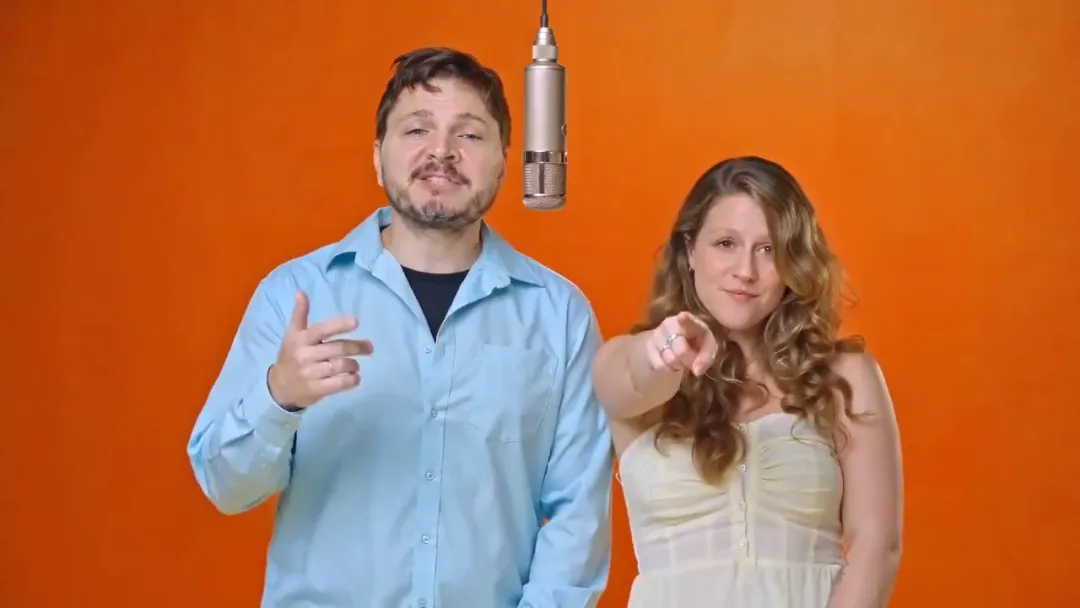
During the second beat, both subjects engage the camera together by pointing at the lens right on rhythm. Choosing solo photos where both individuals look directly forward ensures their animated eye contact stays locked onto the viewer.
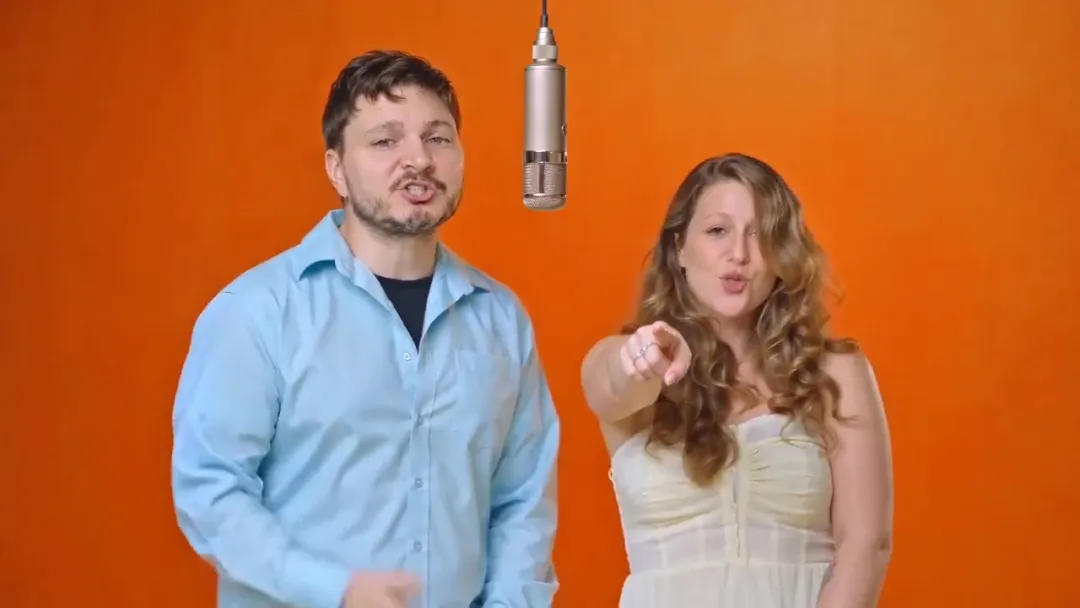
By the third beat, the left performer delivers their verse into the hanging microphone while the right performer supports them with steady hand gestures. Clear clothing in your input photos helps the model keep each person’s outfit consistent while they trade the spotlight.
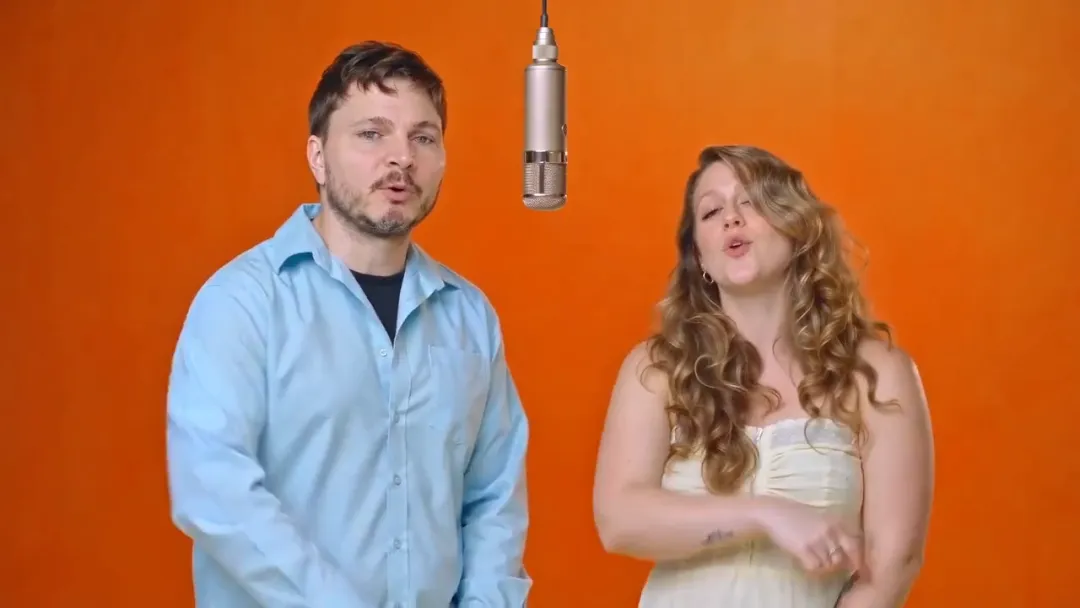
The final frame locks the composition with the hanging microphone centered between both figures as each holds a confident closing pose. Using sharp, front-facing portraits ensures their facial features remain recognizable all the way to the end of the clip.
Compare your own results against these visual benchmarks whenever you upload two photos to run a new generation.
Why There Is No Celebrity Version of the Hotel Lobby AI Trend
You will not find an official option to make a celebrity hotel lobby ai trend video. We only accept photos of yourself or of people who gave clear permission to use their likeness. Real celebrity and public-figure versions are not allowed on the platform.
Do not attempt to upload images of famous personalities or ask for the original recording artists’ faces. If you plan to make a clip using a friend or family member, ask for their consent before uploading their picture to the tool.
Is the Hotel Lobby AI Trend Free? Tools and Prices Compared
Many people wonder if the hotel lobby ai trend is free to create. There is no free video on Ricebowl. New accounts receive 20 credits upon signing up, which is not enough to generate a video because the cheapest option requires 50 credits. A 5-second video rendered at 480p costs 50 credits, while a 5-second video at 720p costs 90 credits. Longer clips cost more credits, and the generate button always displays the exact price before you start. You can purchase a credit pack of 1,000 credits for $49.90 as a one-time payment. This pack remains valid for 365 days and is not a recurring subscription. 15-second clips are reserved for subscribers only. If a generation suffers a technical failure, your credits are refunded automatically. However, credits are not refunded if you simply dislike the visual result, and there is no preview feature to review clips beforehand.
Prices were read on 2026-10-10 and may change.
| Tool | Photos | Length | Price | Song included | Refund on fail | Read on |
|---|---|---|---|---|---|---|
| Ricebowl | 2 (left and right performer) | 5, 10 or 15 sec; 9:16 by default, 16:9 and other ratios available | 50 credits per 5 sec 480p clip, 90 credits at 720p; one-time pack $49.90 for 1,000 credits, valid 365 days, no subscription | Yes, the original track built in (sound on/off toggle) | Yes, credits refunded automatically when a generation fails | 2026-10-10 |
| HotelLobby.ai | 2 (left and right subject) | 15 sec, 16:9 | 20 credits per 480p video (45 at 720p, 80 at 1080p); one-time packs from $9.90 for 50 credits, no subscription | Yes, each template’s own soundtrack; track not named | Yes, failed or blocked generations return reserved credits | 2026-10-10 |
| Hotel Lobby AI (hotellobbyai.pro) | 2 (left and right photo) | Not stated | $14.99 one-time for 270 credits, up to 3 videos (about $5.00 each); credits valid 90 days | Not stated | Yes for technical failures; safety-blocked outputs are not refunded automatically | 2026-10-10 |
| Mitte | 2 (left and right character) | 30 sec | Paid plans only, Creative plan minimum: $36/month for 40,000 credits ($25/month billed yearly); per-run credits Not stated | Yes, the original recording | Not stated | 2026-10-10 |
| Dreamina (CapCut) | 2 (one per side; a solo version is possible) | Not stated (its sample prompt asks for 12 sec) | Not stated (free credits for eligible accounts; no plan prices shown publicly) | No fixed track; prompt-based, you set the sound | Not stated | 2026-10-10 |
| Higgsfield (Genjutsu) | Not stated (you upload a source video plus character references) | Not stated | Plans from $15/month for 200 credits; Genjutsu per-run cost Not stated | Not stated | Not stated | 2026-10-10 |
Across the market, different platforms handle the hotel lobby ai trend with varying pricing structures and technical setups. On Ricebowl, you upload two photos to generate a 5-, 10-, or 15-second video in portrait or horizontal ratios, complete with sound built in and an on/off toggle. Failed generations are refunded automatically in credits. On HotelLobby.ai, users upload two photos for a 15-second clip at 16:9 ratio, paying 20 credits for 480p, 45 credits for 720p, or 80 credits for 1080p from credit packs starting at $9.90 for 50 credits. Hotellobbyai.pro charges a one-time fee of $14.99 for 270 credits (up to 3 videos), with credits valid for 90 days; its clip length is not stated, its audio inclusion is not stated, and blocked generations do not trigger automatic refunds. Mitte requires a monthly subscription starting at $36 per month for 40,000 credits to make 30-second clips, while its per-run credit cost is not stated and refund terms are not stated.
Other tools handle the generation process differently. Dreamina (CapCut) allows users to build clips using prompts and reference photos, but its public plan prices and refund policies are not stated. Tools like Higgsfield utilize a source video paired with character reference photos, charging subscription plans from $15 per month for 200 credits, though its Genjutsu per-run credit cost, audio inclusion, and refund policy are not stated. For Kling, pricing details and specific generation costs are not stated on its primary site.
To get started on Ricebowl, pick up one of our credit packs to fund your renders. Once you have your credits ready, head straight to the hotel lobby AI maker to produce your clip.
Hotel Lobby AI Prompt Ideas You Can Copy
When using Ricebowl, the scene prompt is completely built in and hidden, meaning you never have to type a single word. However, if you are using external tools that ask for a reference video alongside two uploaded portraits, you will need a specific hotel lobby ai prompt to set up the scene.
Here is a comprehensive hotel lobby ai prompt that establishes every detail:
Recreate the reference video with new people: the person on the left becomes the person in image 1, the person on the right becomes the person in image 2. Keep their faces, hair and clothing faithful to the photos and never swap or merge them. Keep everything else from the reference video: the plain solid orange studio wall, the single hanging microphone between them, the camera framing, their moves, gestures and rhythm. No text, no logos, no captions.If your tool works better with shorter instructions, use this compact alternative:
keep everything the same in the video just replace the faces with the two people in the 2 images providedWhen experimenting with prompt-driven systems, keep these practical tips in mind:
- Refer to subjects clearly as “the person in image 1” or “the person in image 2” rather than using ambiguous pronouns like “he” or “she”.
- Change one parameter at a time so you can track how each adjustment affects your output.
- If a generation looks slightly off, run the generation again before swapping out your source photos, as every output produces minor variations.
Before You Post Your Hotel Lobby AI Trend Video
Before sharing your finished clip with your followers, review these final checks:
- Remember that technical generation failures return credits automatically, but subjective dissatisfaction does not qualify for a refund.
- Because there is no preview available, verify that your uploaded portraits have clear lighting and visible faces before spending credits.
- Always get permission from your friend or partner before using their image in a generation.
- Be sure to tag your upload as AI-generated when posting your video to TikTok or Instagram.
- Avoid using photos that contain visible corporate logos, watermarks, or prominent brand marks.
- Generated videos remain completely private by default until you choose to download and share them publicly.
When you are ready to produce your video, visit Ricebowl’s Hotel Lobby AI tool. If you want to understand how video generation models work in general, check out our guide on how to do any AI trend. You can also explore more trends across our site, including the Zombie AI Trend, the AI Dance Generator, the Burning Bridges Video, or the Alors On Danse AI Meme.
Sources
- Prices: Ricebowl, HotelLobby.ai, hotellobbyai.pro, Mitte, Dreamina (CapCut), Higgsfield, read 2026-10-10.
- Search results and related searches: Google US, read 2026-10-10.
- Own data: Ricebowl production log, read 2026-10-10.